

UPI
UPI Txn - Intent Mandate
Prerequisites
Key integration changes for integrating UPI Autopay via Hyper SDK
- Have questions?
- Need help? Contact support
- LLM? Read llms.txt

UPI Intent Mandate flow (user selects one of the UPI enabled Apps present in his phone), registers for the mandate and approves autodebit via the respective app.
UPI Intent and Autopay feature shall be enabled by acquirer / PG
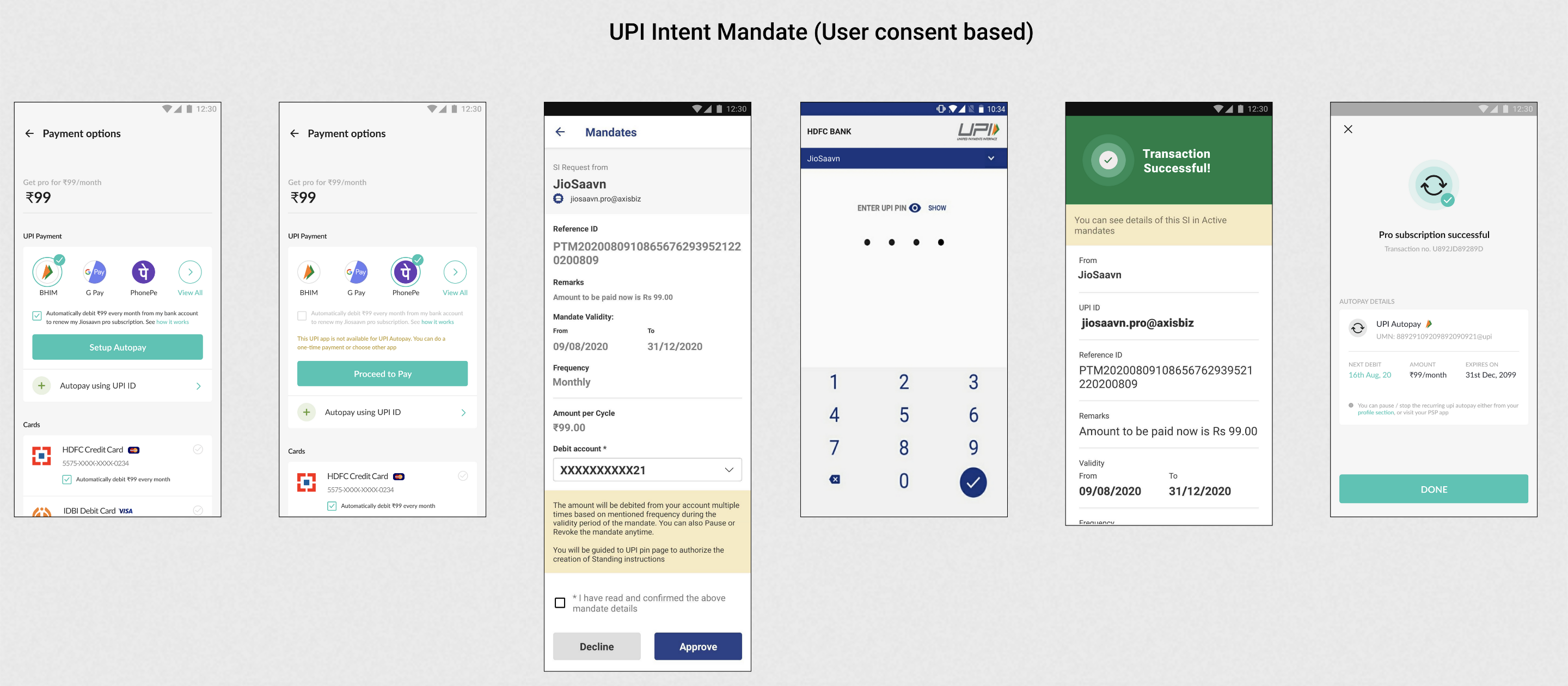
Step 1 - Customer context creation
Create or Get Customer on the Juspay Server. It is recommended to make this API call before opening the payment page.
Step 2 - Order creation
Create Order on the Juspay Server.
Step 3 - Check available apps supporting UPI Autopay
Use 'List available mandate UPI apps' call to fetch all UPI PSP apps available on the users device that supports mandate. Pls proceed with mandate registration transaction only is the UPI app supports mandates.
Step 4 - Initiate upi transaction
Use upiTxn operation to process UPI Collect Mandate or UPI Intent mandate registration. Please ensure that two additional parameters are passed for mandate registration (in comparison with UPI Intent/ Collect one-time transactions)
shouldCreateMandate :: true
Step 5 - Check mandate registration status
Use Juspay order status API to check the status of mandate.
Step 6 - Recurring payments
Once the mandate registration status is successful, use Juspay APIs to directly debit the user account for renewals.
Fetch active mandates for the customer using list mandates API
Debit the user account using execute mandate API
Revoke user mandates using revoke mandate API
Send mandate notification using notification API and check notification status using notification status API. It is mandatory to send pre-debit notification to the user 24 hours before the execution of the mandate.
API Reference - https://docs.juspay.in/api-reference
Default value for 'showLoader' param, when not passed, is set to true.
 Have questions?