


Offers Configuration
The Juspay Offers Dashboard allows you to configure and manage all your promotional offers directly within your checkout experience. Using this dashboard, merchants can create, update, pause, or delete offers with ease. Each offer can be customized extensively to align with your business logic and customer segments.
The configuration dashboard is divided into three key sections:

Offers Homepage:
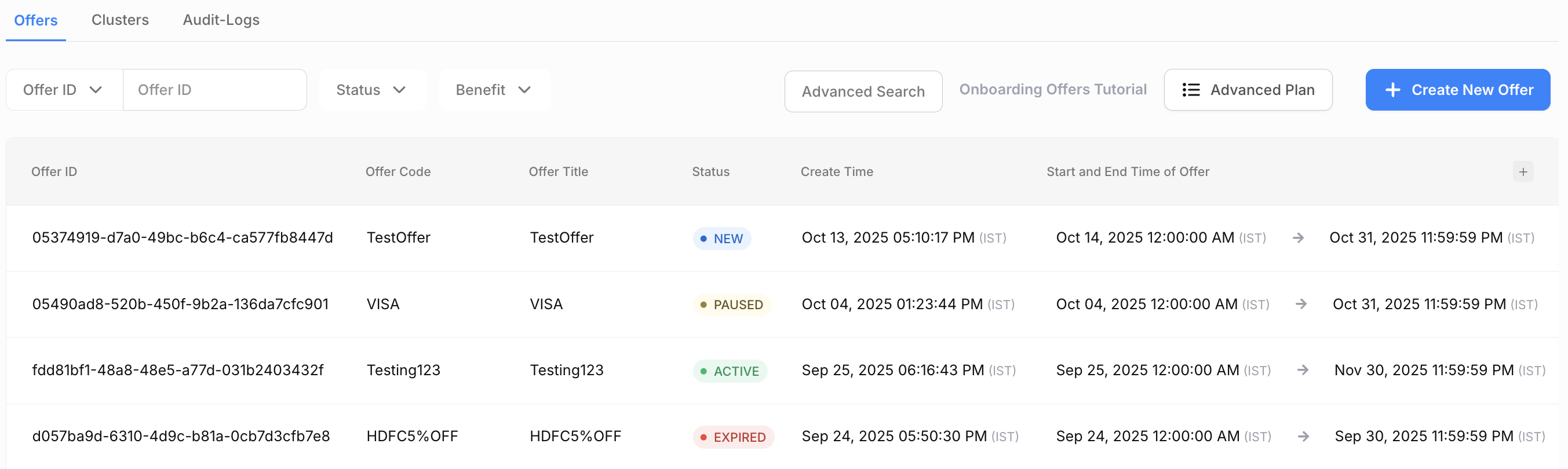
This screen lists the offers created by you, and provides you an option to create more offer campaigns.
A list of all the offers which are configured in the dashboard are displayed here. The offers can be filtered, viewed and downloaded for reconciliation purposes.
Offer Status are as follows:
New - When the offer is created for a future date
Active - When the offer is redeemable by the end user
Paused - A temporary status for the offer invoked by the merchant at anytime within the active state
Expired - When the offer has crossed the last redeemable date for the offer
Once an offer is created on the dashboard there are a few action buttons that get activated for any offer.
Update Offer - Allows the user to update the offer details for an offer in ACTIVE state or allows the user to update all/any details for an offer in NEW state
Duplicate Offer - A functionality that gives an option to create another offer in the system which is exactly similar to the current offer. This feature also gives you the flexibility to change certain rules of the offer and create a new one offer without too much intervention.
Pause Offer - An option to temporarily or permanently stop a particular offer for any reason.
Delete Offer - An option to permanently remove a particular. Note - This action is irreversible.
.png)
Details we can review for Active Offers include:
Offer Details: Overview of the offer’s type, structure, and benefits.
Payment Details: Information on supported payment methods.
Time Constraints: Validity period and active hours for an offer.
Customer Details: Defines which customers or segments are eligible for the offer.
Additional Configurations: Advanced settings like Payment Channel and visibility controls.
Offer Budget Information: Tracks total budget and amount to be utilized.
Create Offers:
Create Offers - The action button on the top right of the offers homepage.
Steps and sections involved in creating an offer on the Juspay Dashboard.
Offer Details
1. Offer level Details
This section defines the fundamental characteristics of the offer.
a. Coupon-Based Offer
Options: Yes / No
Purpose: Indicates whether the offer requires users to apply a coupon/voucher code.
Yes: Customers must enter a coupon code at checkout.
No: The offer is automatically applied without any coupon.
b. Hidden Coupon
Options: Yes / No
Purpose: Determines if the coupon is visible to customers.
Yes: Coupon remains hidden and may be used for internal or targeted campaigns.
No: Coupon code is publicly visible to users.
c. Offer Code / Voucher Code (Mandatory)
Example: PAYTM50, ICIC10, SWIGGYIT
Purpose: The unique identifier or coupon code users will apply to avail of the offer.
Note1. Max character limit is 32
2. For a given CSV, Offer Codes should be unique
d. Offer Title (Mandatory)
Example: “Get 4% Cashback, Earn 10x Rewards”
Purpose: A short, descriptive title that summarizes the offer for users.
e. Offer Display Title
Example: “Get 5% cashback on all purchases”
Purpose: The version of the offer title displayed on customer-facing screens (e.g., checkout, banners).
f. Offer Description
Example: “Get 5% discount up to ₹200 for transactions of ₹1000 and above.”
Purpose: Detailed description explaining offer benefits, limits, or specific eligibility criteria.
g. Add Offer Code for Analytics
Checkbox Option: “Click here to add different Offer code for analytics”
Purpose: Allows you to assign a separate internal code for performance tracking and reporting.
h. Offer Logo
Option: “Choose Logo (e.g., Merchant)”
Purpose: Displays a merchant or partner logo associated with the offer.
Additional Option: “Click here to add custom Offer logo” — enables custom image upload.
Scroll inside to view moreAccepted ValuesDescriptionABPBABPBAIRTELAIRTELAMAZONPAYAMAZONPAYAXISAXISBOIBOIBOMBOMBHARATBHARATCOSMOSCOSMOSCANRCANRCSBCSBCBICBICITICITICUBCUBCREDCREDDEUTDEUTDCBDCBDLSDLSDHANIPAYDHANIPAYDINERSDINERSDUMMYDUMMYFEDFEDFIFIFREECHARGEFREECHARGEGOOGLEPAYGOOGLEPAYHDFCHDFCICICIICICIIDFCIDFCINGINGINDBINDBIOBIOBINDUSINDUSIDBIIDBIJNKJNKJSFBJSFBJSBJSBJUPITERJUPITERKARNKARNKVBKVBKOTAKKOTAKLVBLVBMAESTROMAESTROMASTERCARDMASTERCARDMERCHANTMERCHANTMOBIKWIKMOBIKWIKNAIBNAIBONECARDONECARDPAYZAPPPAYZAPPPAYTMPAYTMPHONEPEPHONEPEPNBPNBPNJSBPNJSBRBLRBLRUPAYRUPAYSARASBSARASBSVCBSVCBSLICESLICESODEXOSODEXOSOIBSOIBSCBSCBSBISBITMBTMBUCOBUCOBUBIUBIVISAVISAYESBYESB
i. Offer Validity (Mandatory)
Field: Date Range Picker
Purpose: Defines the start and end dates/times when the offer is active.
Format: [From-Date] 00:00:00 — [To-Date] 23:59:59
j. Offer Benefits
Dropdown: “Select Offer Benefits”
Purpose: Allows you to link benefit types such as cashback, discount, reward points, free shipping, etc.
k. Offer Payment Method Name
Example: “HDFC Credit Card”, “UPI”, “Paytm Wallet”
Purpose: Specifies the payment method or card type required for offer eligibility.
l. Terms and Conditions
Purpose: Outlines important rules governing the offer, including:
Eligibility (e.g., applicable only for specific cardholders)
Discount/cashback computation
Limitations or exclusions
m. Offer Benefit Max amount
Purpose: Defines the max amount upto which the particular benefit needs to be capped.
n. Offer Benefit Roundoff Rule
Purpose: Defines whether the benefit amount needs to be rounded down or up.
Example Configuration:
|
Field
|
Example Value
|
Description
|
|---|---|---|
Currency
| INR – Indian Rupee
| Offer applies to all payments made in INR
|
Minimum Transaction Amount
| 1,000
| Minimum spend required to unlock the offer
|
Maximum Transaction Amount
| 10,000
| Maximum spend eligible for the offer
|
Apply MOV Check
| Enabled
| Ensures each order segment meets minimum order criteria
|
2. Transaction level Details
The Transaction Level Details section defines the eligibility thresholds and currency settings for an offer. Use this configuration to control when and how an offer applies based on the value of a user’s transaction.
Overview
Use transaction-level settings to specify the minimum and maximum purchase values that qualify for an offer. This ensures that offers are applied only to transactions that meet predefined spending limits.
a. Minimum Transaction Amount
Requirement: Mandatory
Define the minimum transaction value that must be met for a customer to qualify for the offer.
Example: Enter 1000 to apply the offer only when the cart value is ₹1,000 or more.
Purpose: Helps control offer applicability for low-value transactions and ensures cost efficiency for merchants.
Note: Transactions below this threshold will not trigger the offer benefits.
b. Maximum transaction amount
Requirement: Optional
Specify the highest transaction amount eligible for the offer.
Example: Enter 10,000 to restrict offer applicability to transactions up to ₹10,000.
Usage: This cap helps prevent excessive offer usage on high-value transactions.
Tip: Leave blank if you want the offer to apply to all eligible transactions above the minimum threshold.
c. Currency
Requirement: Mandatory
Select the currency in which the offer applies. By default, the currency reflects the merchant’s operating region.
Example: INR – Indian Rupee
Usage: Choose the appropriate currency to ensure alignment with your payment gateway and settlement account.
Scroll inside to view moreAccepted ValuesDescriptionAEDUnited Arab Emirates DirhamALLAlbanian lekAMDArmenian dramARSArgentine pesoAUDAustralian dollarAWGAruban florinBBDBarbadian dollarBDTBangladeshi takaBMDBermudian dollarBNDBrunei dollarBOBBolivian bolivianoBSDBahamian dollarBWPBotswana pulaBZDBelize dollarCADCanadian dollarCHFSwiss francCNYChinese yuan renminbiCOPColombian pesoCRCCosta Rican colonCUPCuban pesoCZKCzech korunaDKKDanish kroneDOPDominican pesoDZDAlgerian dinarEGPEgyptian poundETBEthiopian birrEUREuropean euroFJDFijian dollarGBPPound sterlingGHSGhanian CediGIPGibraltar poundGMDGambian dalasiGTQGuatemalan quetzalGYDGuyanese dollarHKDHong Kong dollarHNLHonduran lempiraHRKCroatian kunaHTGHaitian gourdeHUFHungarian forintIDRIndonesian rupiahILSIsraeli new shekelINRIndian rupeeJMDJamaican dollarKESKenyan shillingKGSKyrgyzstani somKHRCambodian rielKYDCayman Islands dollarKZTKazakhstani tengeLAKLao kipLBPLebanese poundLKRSri Lankan rupeeLRDLiberian dollarLSLLesotho lotiMADMoroccan dirhamMDLMoldovan leuMKDMacedonian denarMMKMyanmar kyatMNTMongolian tugrikMOPMacanese patacaMURMauritian rupeeMVRMaldivian rufiyaaMWKMalawian kwachaMXNMexican pesoMYRMalaysian ringgitNADNamibian dollarNGNNigerian nairaNIONicaraguan cordobaNOKNorwegian kroneNPRNepalese rupeeNZDNew Zealand dollarPENPeruvian solPGKPapua New Guinean kinaPHPPhilippine peso PHPPKRPakistani rupeeQARQatari riyalRUBRussian rubleSARSaudi Arabian riyalSCRSeychellois rupeeSEKSwedish kronaSGDSingapore dollarSLLSierra Leonean leoneSOSSomali shillingSSPSouth Sudanese poundSVCSalvadoran colónSZLSwazi lilangeniTHBThai bahtTTDTrinidad and Tobago dollarTZSTanzanian shillingUSDUnited States dollarUYUUruguayan pesoUZSUzbekistani so'mYERYemeni rialZARSouth African rand
d. Apply MOV Check on Order Breakup
Requirement: Optional
Specify the highest transaction amount eligible for the offer.
Example: Enter 10,000 to restrict offer applicability to transactions up to ₹10,000.
Usage: This cap helps prevent excessive offer usage on high-value transactions.
Tip: Leave blank if you want the offer to apply to all eligible transactions above the minimum threshold.
Example Configuration:
|
Field
|
Example Value
|
Description
|
|---|---|---|
Coupon-Based Offer
| Yes
| Customers must enter a coupon code at checkout.
|
Hidden Coupon
| No
| Coupon code is publicly visible to users
|
Offer Code
| PAYTM50
| The coupon code users will apply to avail of the offer
|
Offer Title
| “Get 4% Cashback, Earn 10x Rewards”
| A short, descriptive title that summarizes the offer for users.
|
Offer Logo
| HDFC
| HDFC logo will be displayed on the Payment page with offer.
|
Offer Validity
| [From-Date] 00:00:00 — [To-Date] 23:59:59
| Defines the start and end dates/times when the offer is active.
|
Offer Benefits
| Discount
| The upfront discount would be given to the user.
|
Payment Details
a. Card Bin Filter
Options: Whitelist/Blacklist
Purpose: Defines the Card Bins eligible for the offer
Whitelist: Offer will be applicable to uploaded bins.
Blacklist: Offer will not be applicable to uploaded bins.
Values for above have to be attached in Filters CSV, and the option to whitelist/blacklist those values will be considered here
b. Card Networks
Purpose: Defines the Card Networks eligible for the offer.
Scroll inside to view moreAccepted ValuesDescriptionVISAVISAMASTERCARDMASTERCARDRUPAYRUPAYAMEXAMEXDISCOVERDISCOVERDINERSDINERSMAESTROMAESTROJCBJCBBAJAJBAJAJ
c. Card Types
Purpose: Defines the list of Card Types eligible for the offer.
Scroll inside to view moreAccepted ValuesDescriptionDEBITDebit CardsCREDITCredit Cards
d. Card Issuers
Purpose: Defines the Card Issuers eligible for the offer
Scroll inside to view moreAccepted ValuesDescriptionACBAsia Commercial BankABPBAditya Birla Payments BankAIRTELAirtel Payments BankALLB-AMAZONPAYAmazon PayAMEXAmerican ExpressANDHRAAndhra BankARYAB-AUBAsia United BankAXISAxis BankBAJAJBajaj FinservBANDHANBandhan BankBOABank of AmericaBBKM-BOBBank of BarodaBOIBank of IndiaBOMBank of MaharashtraBARC-BUPBBaroda U.P. Gramin BankBASSEINBank of Maharashtra, BasseinBHARATBharat Credit Card (HDFC)BMAHILA-BNPPBNP PARIBASCANRCanara BankCAPB-CSBCatholic Syrian BankAVENUES-CBICentral Bank of IndiaCHASEChase Credit CardsCITICiti BankCUBCity Union BankCORP-COSMOSCosmosDBSDBS BankDCBDCB BankDCBBDCB BankDENADena BankDEUTDeutsche Bank AGDLSDSL BankDUMMYDUMMYEPAYLATERePayLaterEQUITASEquitas Small Finance BankESAFESAF Small Finance BankFEDFederal BankFEDSP-FPBFirst PREMIER BankFREECHARGEFREECHARGEGOOGLEPAYGoogle PayGPPB-HDFCHDFCHSBCHSBCICICIICICIIDFCIDFCIPPBIPPB RuPay Virtual Debit CardINDBIndusInd BankIOBIndian Overseas BankINDUS-IDBIIDBIINGING VysyaINSTACREDInstaCred Cardless EMIJNKJammu and Kashmir BankJANACASH-JSFBJana Small Finance BankJSBJefferson Security BankJIOMONEYJioMoneyJPMJPMorgan Chase & CoKLB-KJSBThe Kalyan Janata Sahakari BankKARNKarnataka BankKVBKarur Vysya BankKOTAKKotak Mahindra BankLVBLakshmi Vilas BankLAZYPAYLazyPay BankLINEPAYLINE PayMPESAM-PESAMUCOOP-MOBIKWIKMobiKwikMRUPEEmRUPEENESFBNorth East Small Finance BankNKGSBNKGSB Co-Operative BankNSDLPBNSDL Payments BankOLAMOla MoneyOLAPONEOneCardOBCOriental Bank of CommerceOXICASHOxiCashOXIGENOxiCashPAYPALPayPalPAYTMPaytmPAYUMONEYPayUMoneyPAYZAPPHDFC PayZappPHONEPEPhonePePMCB-PNJSB-PNBPunjab National BankRBLRBL BankRBSRoyal Bank of ScotlandSARASB-SBMBI-SCOT-SVCBSVC BankSIMPLSimplSLICESlice Credit CardsSODEXOSodexoSOIB-SCBStandard Chartered BankSBIState Bank of IndiaSSFBSuryoday Small Finance BankSURYO-SYNB-TNSCTamilnadu State Apex Co-Operative BankTMBTamilnadu Mercantile Bank Credit CardTBSBThane Bharat Sahakari BankTCCBNAIBTJSBTJSB BankTPSLDUMMYUCOBUCO BankUSFBUjjivan Small Finance BankUBIUnion Bank of IndiaUNIBUSBVCBVietcombank Debit card - American ExpressVJYBWFBWells FargoWPB-YESBYES BankYESPAYYES PAY mobile walletZCB-
d. Net Banking
Purpose: Defines the list of Netbanking instruments eligible for the offer.
Scroll inside to view moreAccepted ValuesDescriptionDUMMYDUMMYAXISAxis BankBOIBank of IndiaBOMBank of MaharashtraCBICentral Bank of IndiaDCBDCB BankFEDFederal BankHDFCHDFCICICIICICIIDBIIDBIINDBINDBINDUSIndusInd BankIOBIndian Overseas BankJNKJammu & Kashmir BankKARNKarnataka bankKVBKarur Vysya BankSBIState Bank of IndiaSOIBSOIBUBIUnion Bank of IndiaYESBYes Bank LimitedCUBCity Union BankCANRCanara BankCITICitibankDEUTDeutsche BankKOTAKKotak Mahindra BankDLSDLSINGING GroupCSBCSB BankSCBStandard CharteredTMBTamilnad Mercantile BankSARASBSaraswat Co-operative BankJSBJanata Sahakari BankLVBLakshmi Vilas BankPNJSBPNJSBRATNRATNSVCBSVC BankPNBCORPPNB CorporatePNBPunjab National BankUCOBUCO BankCOSMOSCosmos Co-operative BankIDFCIDFC First Bank LimitedNAIBNAIB BANKBHARATBharat BankRBLRBL BankKVBCORPKVB CorpAIRTELAirtel Payment BankUBICORPUnion Bank CorporateABIRLAAditya Birla Payments BankJANAJana Small Finance BankPAYTMPayTMDBSDBS Bank Limited
e. Wallet Instruments
Purpose: Defines the list of wallets eligible for the offer.
Scroll inside to view moreAccepted ValuesDescriptionPHONEPEPHONEPEGOOGLEPAYGOOGLEPAYSIMPLSIMPLPAYZAPPPAYZAPPAIRTELMONEYAIRTELMONEYLAZYPAYLAZYPAYOLAMONEYOLAMONEYJIOMONEYJIOMONEYPAYPALPAYPALLOANTAPLOANTAPFREECHARGEFREECHARGEMOBIKWIKMOBIKWIKAMAZONPAYAMAZONPAYPAYTMPAYTMCREDCREDPAYTM_POSTPAIDPAYTM_POSTPAIDPAYUMONEYPAYUMONEYAMEXEZECLICKAMEXEZECLICKMPESAMPESALIMELIMEICASHICASHMRUPEEMRUPEEYPAYCASHYPAYCASHPAYCASHPAYCASHIDEAMONEYIDEAMONEYOLAPOSTPAIDOLAPOSTPAIDTATAPAYTATAPAYBAJAJPAYBAJAJPAY
f. Rewards
Purpose: Defines the list of Rewards instruments eligible for the offer
g. Consumer Finance
Purpose: Defines the list of Consumer Finance instruments eligible for the offer.
Scroll inside to view moreAccepted ValuesDescriptionCAPITALFLOTCAPITALFLOTEPAYLATEREPAYLATERFLEXMONEYFLEXMONEYFLEXIPAYFLEXIPAYICICIPAYLATERICICIPAYLATERZESTMONEYZESTMONEYAMAZONPAYLATERAMAZONPAYLATER
h. UPI Collect handles
Purpose: Defines the list of UPI Collect handles eligible for the offer.
Scroll inside to view moreAccepted ValuesDescriptionyblyblaxlaxlokhdfcbankokhdfcbankokaxisokaxisokiciciokicicioksbioksbipaytmpaytmupiupiaplaplaxisbaxisbikwikikwikibliblyaplyaplraplraplabfspayabfspayidfcbankidfcbankiciciiciciyesgyesgjupiteraxisjupiteraxisgoaxbgoaxbNIYOICICINIYOICICIindusinduspingpaypingpayshriramhdfcbankshriramhdfcbanksliceaxissliceaxistapicicitapicicitimecosmostimecosmosyesbankyesbankidfcbankidfcbankwaiciciwaiciciwaaxiswaaxiswahdfcbankwahdfcbankwasbiwasbizoicicizoicici
i. UPI apps
Purpose: Defines the list of UPI Intent apps eligible for the offer.
Scroll inside to view moreAccepted ValuesDescriptionBHIM_IOSBHIM iOS appPHONEPE_ANDROIDPhonepe Android appPHONEPE_IOSPhonepe Android appGOOGLE_PAY_ANDROIDGoogle pay android appGOOGLE_PAY_IOSGoogle pay ios appPAYTM_ANDROIDPaytm android appPAYTM_IOSPaytm ios appWHATSAPP_BUSINESSWhatsapp businessICICI_IMOBILEICICI mobileSBISBIAXIS_PAYAXIS_PAYSAMSUNG_SPAYMINISAMSUNG_SPAYMINISAMSUNG_SPAYSAMSUNG_SPAYHDFC_SNAPWORKHDFC_SNAPWORKPNBPNBICICI_POCKETSICICI_POCKETSBANK_OF_BARODABANK_OF_BARODAFREECHARGEFREECHARGEUNBIUNBIAXIS_MOBILEAXIS_MOBILEKVB_MYCOMPANYKVB_MYCOMPANYVIJAY_ BANKVIJAY_ BANKDENADENAJAMMU_AND_KASHMIRJAMMU_AND_KASHMIRKOTAKKOTAKHDFC_WIBMOHDFC_WIBMOHIKEHIKEIDFC_PSPIDFC_PSPYES_BANKYES_BANKABIPBLABIPBLPOLYMERPOLYMERFINOFINOORIENTAL_BANK_OF_COMORIENTAL_BANK_OF_COMMERCEMERCEFEDERAL_BANKFEDERAL_BANKINDUS_BANKINDUS_BANKWIZELYWIZELYDCBDCBYES_MERCHANTYES_MERCHANTDBSDBSMOBIKWIKMOBIKWIKRBL_MOBANKRBL_MOBANKHILLRHILLRCITRUSPAYCITRUSPAYSOUTH_INDIAN_BANKSOUTH_INDIAN_BANKAMAZON_MSHOPAMAZON_MSHOPMI_PAYMI_PAYWHATSAPPWHATSAPPTRUECALLERTRUECALLEROLAOLAMYAIRTEL_APPMYAIRTEL_APPPAYTM_MALLPAYTM_MALLGB_WHATSAPPGB_WHATSAPPANGEL_MOBILEANGEL_MOBILEFUNDS_INDIAFUNDS_INDIAIMUTHOOTIMUTHOOTANGEL_WEALTHANGEL_WEALTHCREDPAY_IOSCREDPAY_IOSCREDPAY_ANDROIDCREDPAY_ANDROIDJupiter_AndroidJupiter_Android
j. Transaction Type
Purpose: Defines the list of transaction mode where the offer is eligible.
Options: Order
Counters
a. Budget Velocity Counter
Purpose: Number of times an offer can be applied in the given time period
b. Budget Amount Counter
Purpose: Maximum amount for which an offer is valid
c. Card Velocity Counter
Purpose: Number of times offer is valid for a unique card
d. Card Amount Counter
Purpose: Maximum amount per card for which offer is valid
e. Customer Velocity counter
Purpose: Number of times offer can be availed by a customer
f. Customer Amount Counter
Purpose: Total amount that can be availed by a customer
Customer & additional Filters
1. Customer Level Targeting Filters
a. Customer Email filter:
Options: WHITELIST/BLACKLIST
Purpose: This is used to target customers using email.
Whitelist: Offer will be applicable to uploaded emails.
Blacklist: Offer will not be applicable to uploaded emails.
b. Customer Id filter:
Options: WHITELIST/BLACKLIST
Purpose: This is used to target customers using customer id.
Whitelist: Offer will be applicable to uploaded customer id.
Blacklist: Offer will not be applicable to uploaded customer id.
c. Customer Mobile filter:
Options: WHITELIST/BLACKLIST
Purpose: This is used to target customers using mobile numbers.
Whitelist: Offer will be applicable to uploaded mobile numbers.
Blacklist: Offer will not be applicable to uploaded mobile numbers.
2. Additional Targeting Filters
a. UDF1 - UDF8:
Options: WHITELIST/BLACKLIST
Purpose: This is used to target by using udf.
Whitelist: Offer will be applicable to uploaded udf.
Blacklist: Offer will not be applicable to uploaded udf.
b. Gateway_reference_id:
Options: WHITELIST/BLACKLIST
Purpose: This is used to target by using gateway reference id.
Whitelist: Offer will be applicable to uploaded gateway reference id.
Blacklist: Offer will not be applicable to uploaded gateway reference id.
Values for above have to be attached in Filters CSV, and the option to whitelist/blacklist those values will be considered here
Additional Configuration
a. Payment Channel
Purpose: Used when the offer needs to be displayed only on specific platforms (e.g., Android, iOS, or Web).
- Have questions?
- Need help? Contact support
- LLM? Read llms.txt
