


Simpl pay-in-3
How it works
Simpl Pay-in-3 Integration using the SIKA_SIMPL Gateway
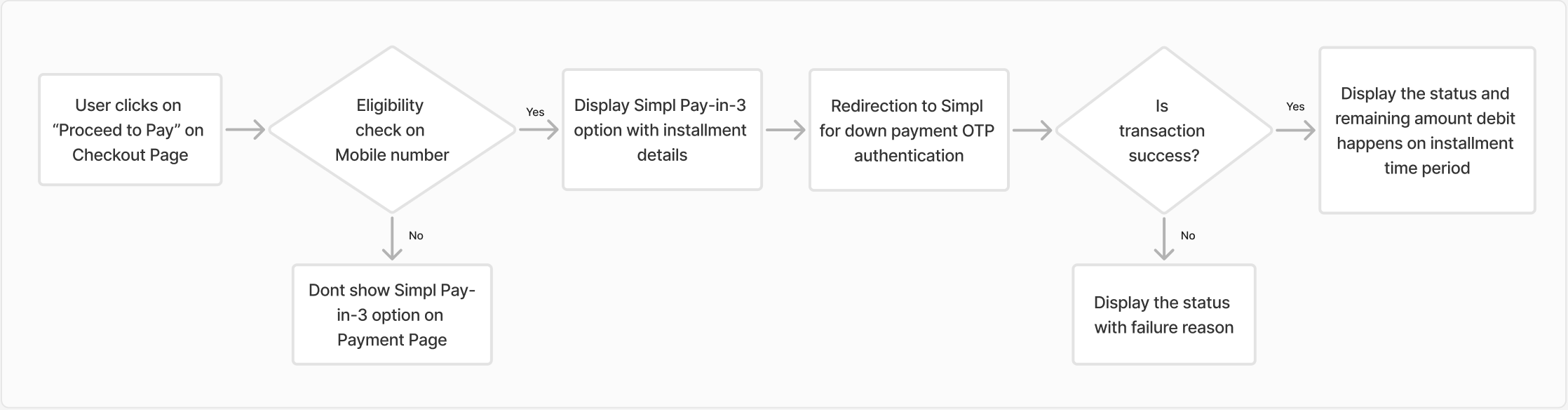
Step 1: The user checkouts and navigates to the payment page within the merchant app.
Step 2: If user mobile number is eligible, Simpl pay-in-3 payment option is exclusively displayed to eligible users.
Step 3: The user opts for "Simpl Pay-in-3" as the payment method and the installment amount segregation to be paid by the user will be shown upfront to the user on the Merchant’s payment page.
Step 4: The user is redirected to Simpl’s website to pay the downtime payment
The user inputs the OTP sent to their mobile number for verification.
Payment is completed, order gets placed and the user is redirected back to the merchant’s app/website.
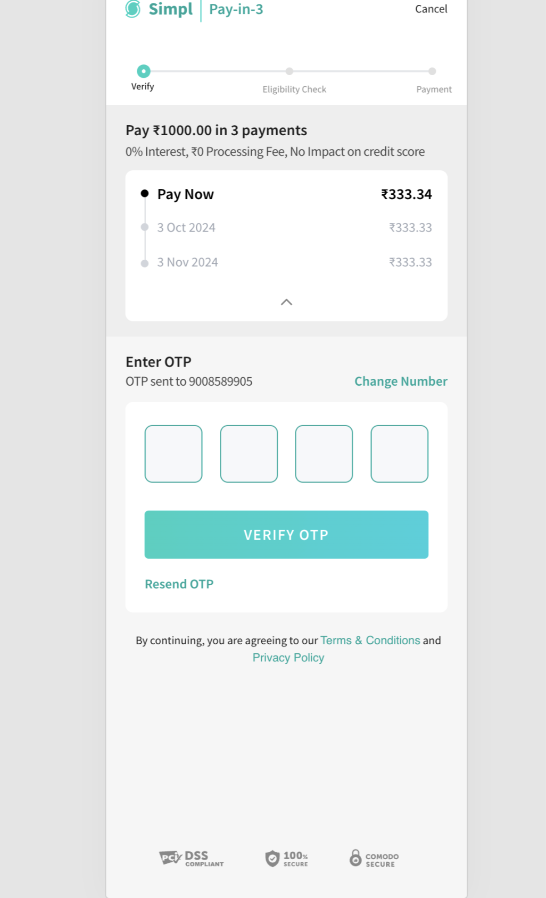
OTP Authentication on Simpl's Page
Transaction Flow
Analytics
You can use the Transaction Analytics Module in Juspay Dashboard to monitor the traffic and performance of Simpl pay-in-3 transactions.
- Have questions?
- Need help? Contact support
- LLM? Read llms.txt
