


TPV Configurations
Step 1: Get support enabled for your account by your PA/PG
Reach out to the eligible PA/PG(s) to enable support for your account.
PA/PG Supported :
TPV: Billdesk, CAMSPay, Gocashfree, HDFC_UPI, PayU, Razorpay, Yes Biz
TPV Mandate: Billdesk, Gocashfree, HDFC_UPI, ICICI_UPI, RBL Bank, Yes Biz
Please verify the list of payment methods supported for TPV by PA/PG
Step 2: Update PA/PG set up on Juspay Dashboard
For TPV flow, Update the configurations for selected PA/PG(s) on Juspay Dashboard to add support for TPV.
Login to Juspay Dashboard > Navigate to Payments > PG Control Centre > Select gateway.
Click on “Edit” Configured Payment methods and select “TPV Banks”
Enable Netbanking and UPI payment methods under TPV Banks section
Along with this, enable the Payment methods under Netbanking / UPI section
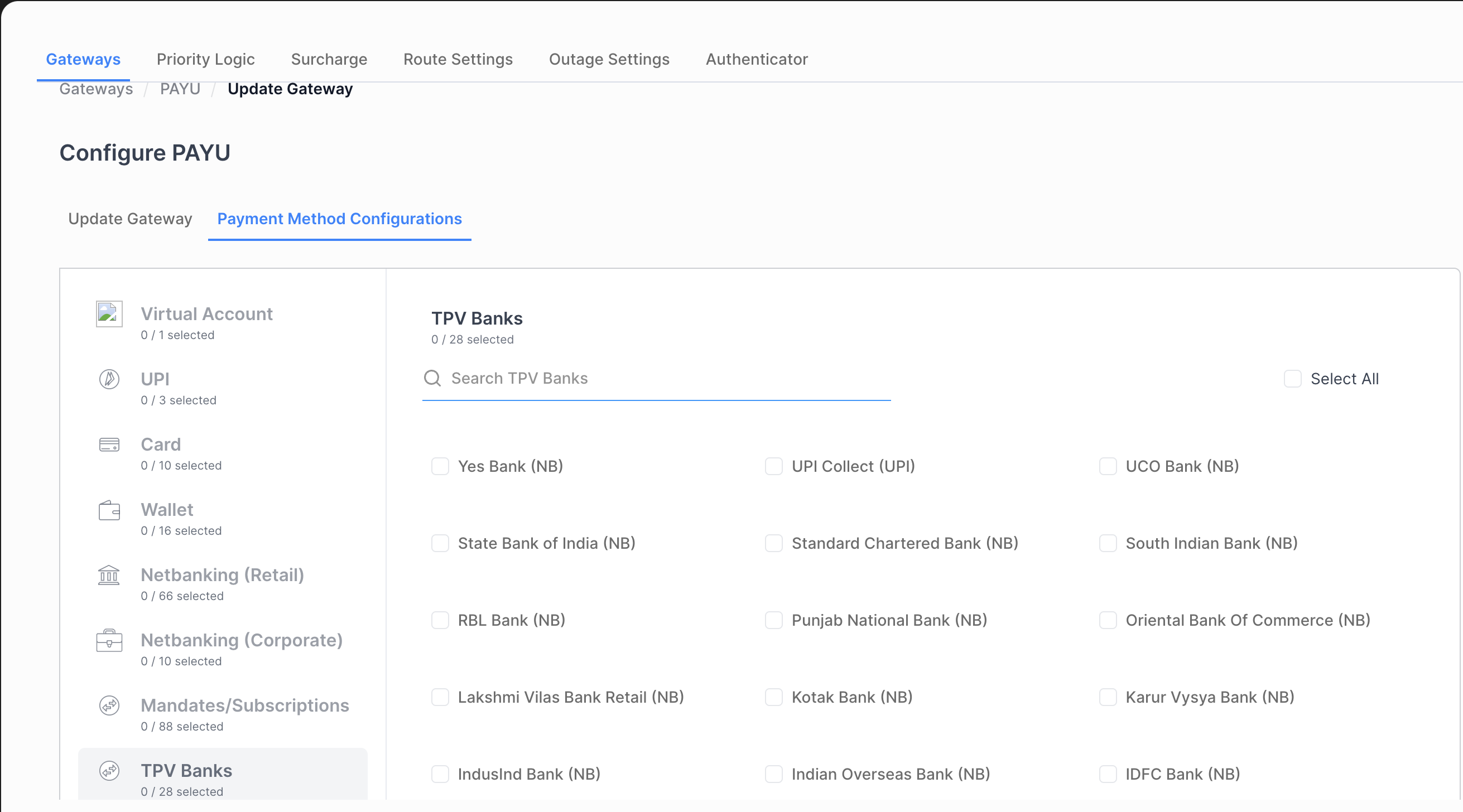
Click on Proceed button.
The account will be configured and a success message will be displayed on the screen.
Repeat steps for all gateways/aggregators which have added support of this feature for your account.
NotePlease make sure that the Payment methods enabled under TPV Banks has to enabled at the respective payment method section
For Example,If “HDFC Bank” is selected under TPV Banks, then “HDFC Bank” has be enabled under Netbanking(Retail)
If “UPI Collect” is selected under TPV Banks, then “UPI Collect” has to be enabled under UPI
For TPV Emandate flow, Update the configurations for selected PA/PG(s) on Juspay Dashboard to add support for TPV.
Login to Juspay Dashboard > Navigate to Payments > PG Control Centre > Select gateway.
Click on “Edit” Configured Payment methods and select “TPV Banks”
Enable UPI payment methods under TPV Mandate section
Along with this, enable the respective Payment methods (UPI Collect / UPI Intent) under UPI section
.png)
Click on Proceed button.
The account will be configured and a success message will be displayed on the screen.
Repeat steps for all gateways/aggregators which have added support of this feature for your account.
NotePlease make sure that the Payment methods enabled under TPV Banks has to enabled at the respective payment method (UPI) section
For Example,If “UPI Collect” is selected under TPV Mandate section, then “UPI Collect” has be enabled under UPI section
- Have questions?
- Need help? Contact support
- LLM? Read llms.txt
