


Advance EMI Suite
Feature specifications:
Standard EMI:
PA/PGs support EMI plans from a selected set of issuers.Your PA/PG needs to enable EMI support for your account for Juspay EMI feature to work
Merchants can source EMI plans from respective PA/PGs or directly from Banks/NBFCs
Please find below the list of PA/PGs that support Credit Card EMI plans:
Scroll inside to view moreBank nameEMI Tenure (months)Supported GatewaysHDFC Bank3, 6, 9, 12, 18, 24, 36Razorpay, PayU, Pinelabs, Paytm_V2, Gocashfree, Billdesk, EasebuzzCITI Bank3, 6, 9, 12, 18, 24Razorpay, PayU, Pinelabs, Paytm_V2, Gocashfree, Billdesk, EasebuzzICICI Bank3, 6, 9, 12, 18, 24Razorpay, PayU, Pinelabs, Paytm_V2, Gocashfree, Billdesk, Easebuzz, CCAvenueState Bank of India3, 6, 9, 12Razorpay, PayU, Pinelabs, Paytm_V2, Gocashfree, Billdesk, CCAvenue, EasebuzzAXIS Bank3, 6, 9, 12, 18, 24Razorpay, PayU, Pinelabs, Paytm_V2, Gocashfree, Billdesk, CCAvenue, EasebuzzStandard Chartered Bank3, 6, 9, 12, 18, 24Razorpay, PayU, Pinelabs, Paytm_V2, Gocashfree, Billdesk, EasebuzzKotak Bank3, 6, 9, 12, 18, 24Razorpay, PayU, Pinelabs, Paytm_V2, Gocashfree, Billdesk, CCAvenue, EasebuzzHSBC Bank3,6,9,12,18,24Razorpay, PayU, Pinelabs, Paytm_V2, Gocashfree, Billdesk, CCAvenueBank Of Baroda3,6,9,12,18,24Razorpay, PayU, Pinelabs, Paytm_V2, Gocashfree, BilldeskAU Small Finance Bank3,6,9,12,18,24PayU, Paytm_V2, Gocashfree,AMEX3,6,9,12Razorpay, PayU, Pinelabs, Paytm_V2, Gocashfree, Billdesk, CCAvenueIndusInd Bank3,6,9,12,18,24Razorpay, PayU, Pinelabs, Paytm_V2, Gocashfree, Billdesk, CCAvenueIDFC Bank3,6,9,12,15,18,24,36PayU, Paytm_V2, BilldeskJ&K Bank3,6,9,12BilldeskOneCard3,6,9,12,18,24Razorpay, PayU, Pinelabs, Paytm_V2IDBI Bank3,6,9,12PayU, Paytm_V2, BilldeskFederal Bank3,6,9,12,18,24Razorpay, GocashfreeRBL Bank3,6,9,12,18,24Razorpay, PayU, Pinelabs, Paytm_V2, Gocashfree, BilldeskYES Bank3,6,9,12,18,24Razorpay, PayU, Pinelabs, Paytm_V2, Gocashfree, BilldeskPlease find below the list of PA/PGs that support Debit Card EMI plans:
Scroll inside to view moreBank nameEMI Tenure (months)Supported GatewaysState Bank of India6, 9, 12, 18PayU, BilldeskKotak Bank1, 2, 3, 6, 9, 12Razorpay, PayU, PinelabsFederal Bank3, 6, 9, 12PayUBank Of Baroda3, 6, 9, 12, 18Razorpay, PayUICICI Bank3, 6, 9, 12PayU, Pinelabs, Paytm_V2AXIS Bank3, 6, 9, 12, 18, 24PayU, PinelabsHDFC Bank3, 6, 9, 12, 18Razorpay, PayU, Pinelabs, Paytm_V2, BilldeskBAJAJFINSERV3, 6, 9, 12Razorpay, PayU, BajajFinservPlease find below the list of PA/PGs that support Cardless EMI plans:
Scroll inside to view moreBank nameEMI Tenure (months)Supported GatewaysKotak Bank3, 6, 9, 12, 18, 24, 36Easebuzz, ShopSeICICI Bank3, 6, 9, 12, 18, 24, 36Easebuzz, ShopSeHDFC Bank3, 6, 9, 12, 18, 24, 36Easebuzz, ShopSe
Please find below the list of PA/PGs that support Other EMI plans:
Scroll inside to view moreBank nameEMI Tenure (months)Supported GatewaysBajaj Finserv3, 6, 9, 12, 18, 24, 36Easebuzz, ShopSe
No-cost EMI / Low-cost EMI:
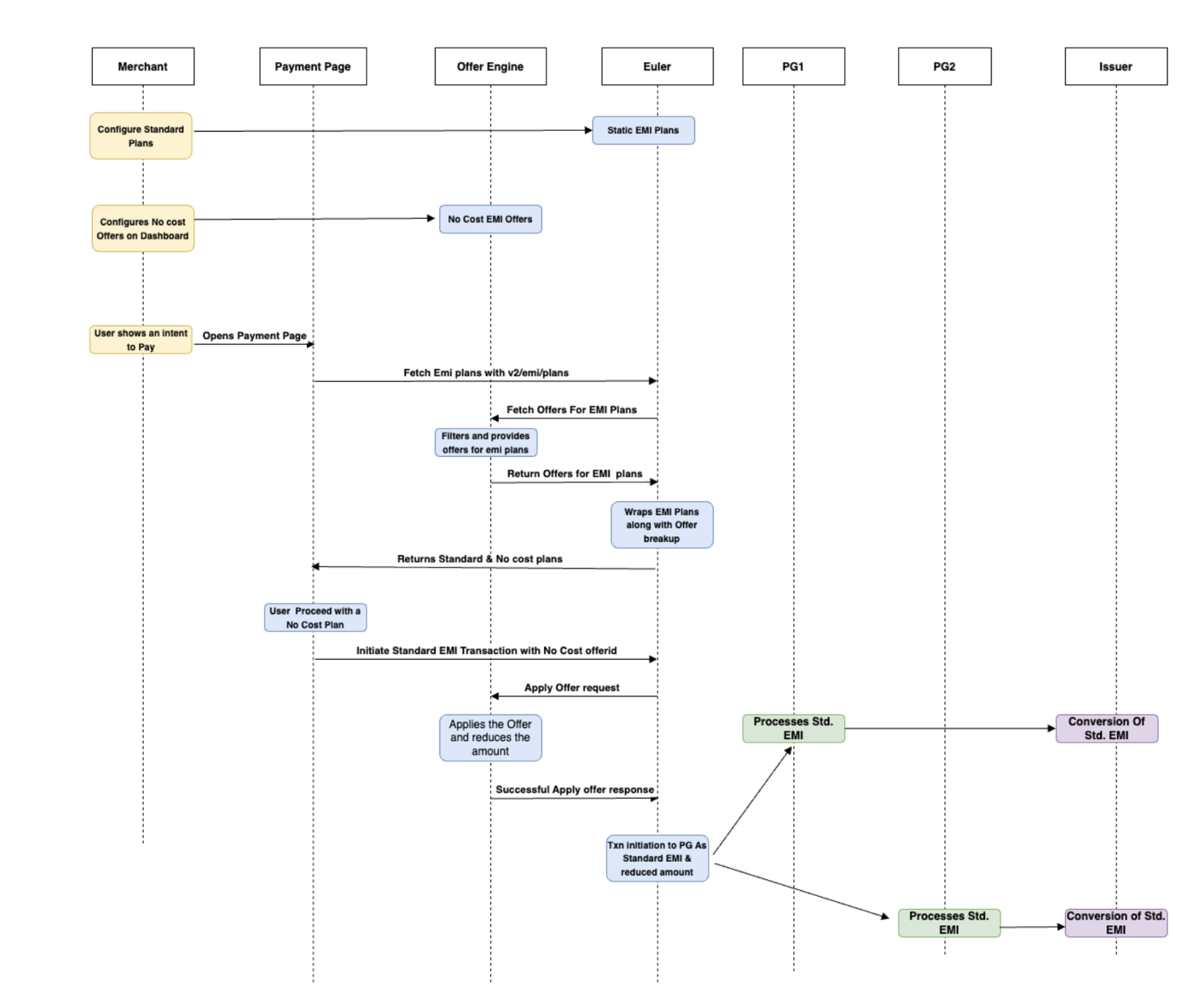
No Cost EMI Flow No-cost and Low-cost EMI can be enabled as Offers (Discounts/Cashbacks) to the users on the payment page.
Standard EMI plans can be procured from the gateways and configured on Juspay dashboard
EMI related offers (discount/ cashback) can be enabled against the Standard EMI plans using the Juspay Offers dashboard for low cost and no cost flow.
EMI Offer Configuration is supported at an order level , order breakup level as well as at an individual product level.
Complete breakup information regarding EMI and discount being offered is also provided which can be used to provide a seamless user experience.
EMI Plan Configuration
EMI plan configuration is mandatory for all three types(Standard,Low-cost and No-cost) of EMI integration
Only configured standard EMI plans will be visible during the Offer configuration for No-cost and Low-cost EMI on Juspay Offers dashboard
Standard EMI Plan Configuration
With varied level of Integration, Juspay offers three different ways in which you can configure EMI plans on Juspay Dashboard for a selected PA/PG:Juspay <> PayU, Razorpay, CCAvenueV2
Juspay is integrated with these PGs with capabilities to sync as and when required to get account details
Hence, when you configure these gateways on Juspay Dashboard, Juspay in turn checks with the gateways to fetch the payment methods and list of EMI plans configured enabled for your account.
You can enable the EMI plans as per business requirement from the list available
Juspay <> Pinelabs, Paytm (Paytm_v2) , Billdesk, TPSL, Easebuzz, Bajaj Finserv, Cashfree, ShopeSe & HDFC
Manual configuration of EMI Plans is needed to be done on Juspay Dashboard by the merchant after procuring the EMI plan details from the PA/PG
Details required for configuration on Juspay dashboard:
Type of card (Credit | Debit | Cardless)
EMI type (Standard EMI)
Tenure
Min Order Amount
Max Order Amount
Processing fee (if any)
Annual Interest rate
Low Cost and No Cost EMI Plan Configuration
Once a standard EMI plan is configured, you can use Juspay Offers Dashboard to configure EMI related offers (discount/ cashback) against the Standard EMI plans to convert them into low cost and no cost EMI plans.
For enabling No-Cost EMI plan: The interest rates are discounted to 100% i.e Interest subvention will be 100%
For enabling Low-cost EMI plans: The discount on interest rate can be defined as per your business requirements or you can also define subvented interest rate against each plan separately.
Offers can be enabled on EMI plans based on different filters / parameters:
EMI discounts can be applied at the Order level. For example, only if the cart value exceeds Rs. 5,000, then a No Cost EMI offer can be applied to the entire cart value.
EMI discounts can also be applied at the Product level. For example, if there are 2 items of Product1 and 2 items of Product2 in the cart, the offer logic can specify that No Cost EMI is only applicable to one quantity of each product.
EMI discounts can be also be combined with instant discounts at an Order level. For example, if the cart value exceeds Rs. 5,000, an instant discount will be applied first, followed by a No Cost EMI offer on the discounted cart value.
EMI Plan Visibility on Payment Page:
If you are using Juspay HyperCheckout (Payment Page), then EMI Plan details can be made visible to your users on all the following placeholders
EMI plans for any saved cards can be displayed upfront. Additionally, the payment page can include a separate section that showcases all available EMI plans at once.
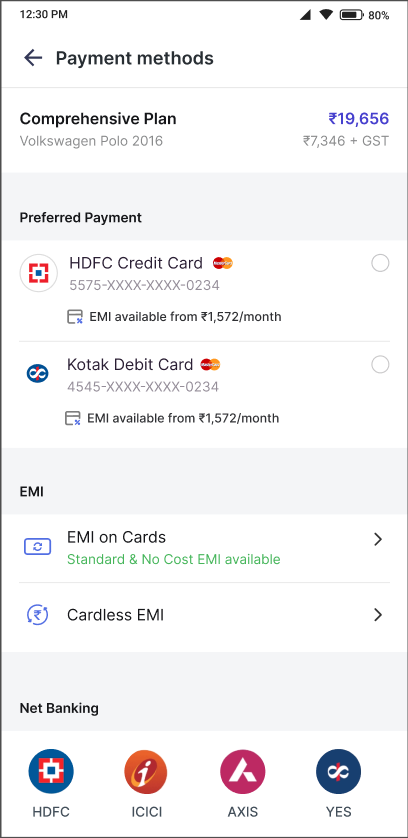
Similarly, No Cost and Low Cost EMI options can be displayed in a separate EMI section on the payment page, along with additional subtext about the available offers.
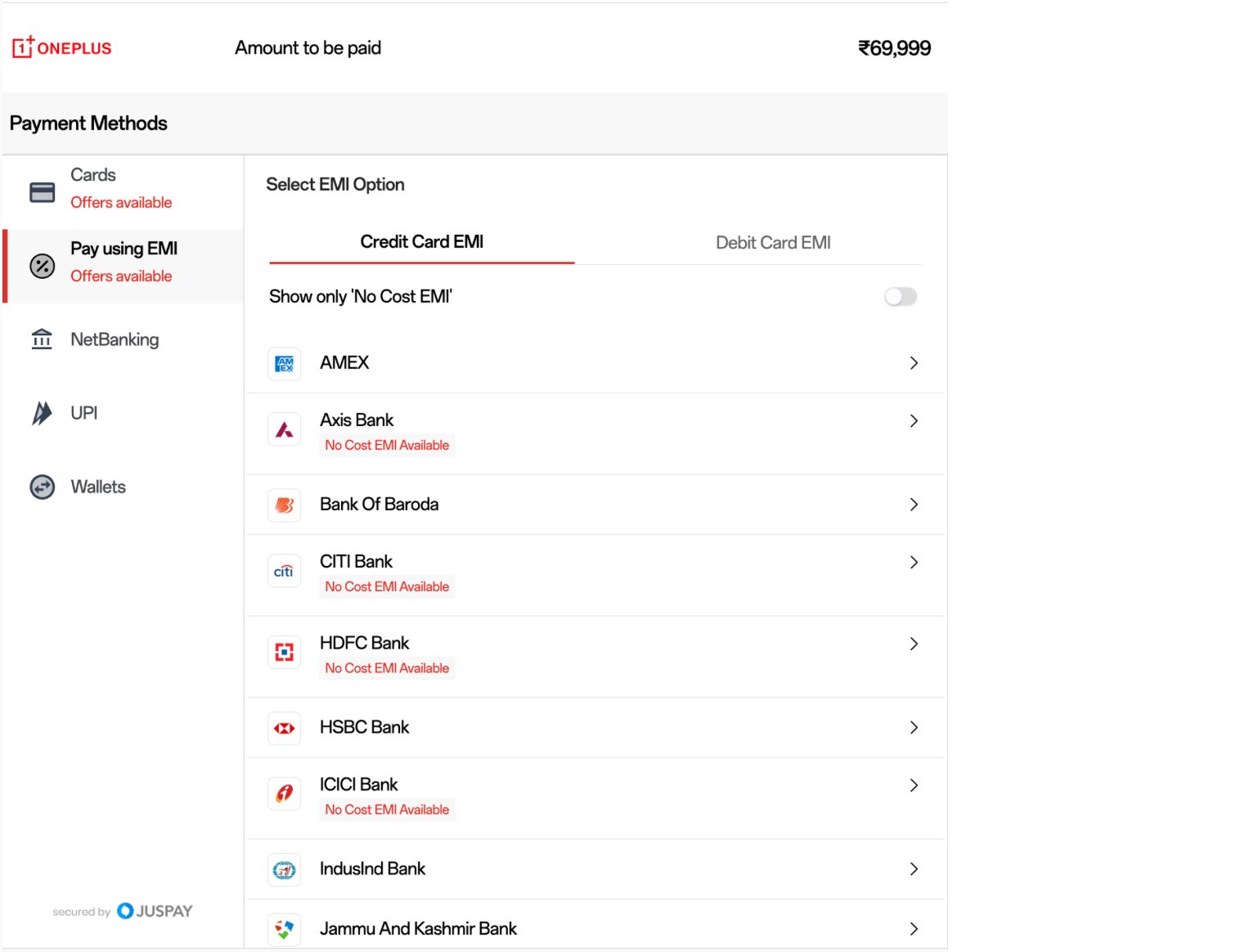
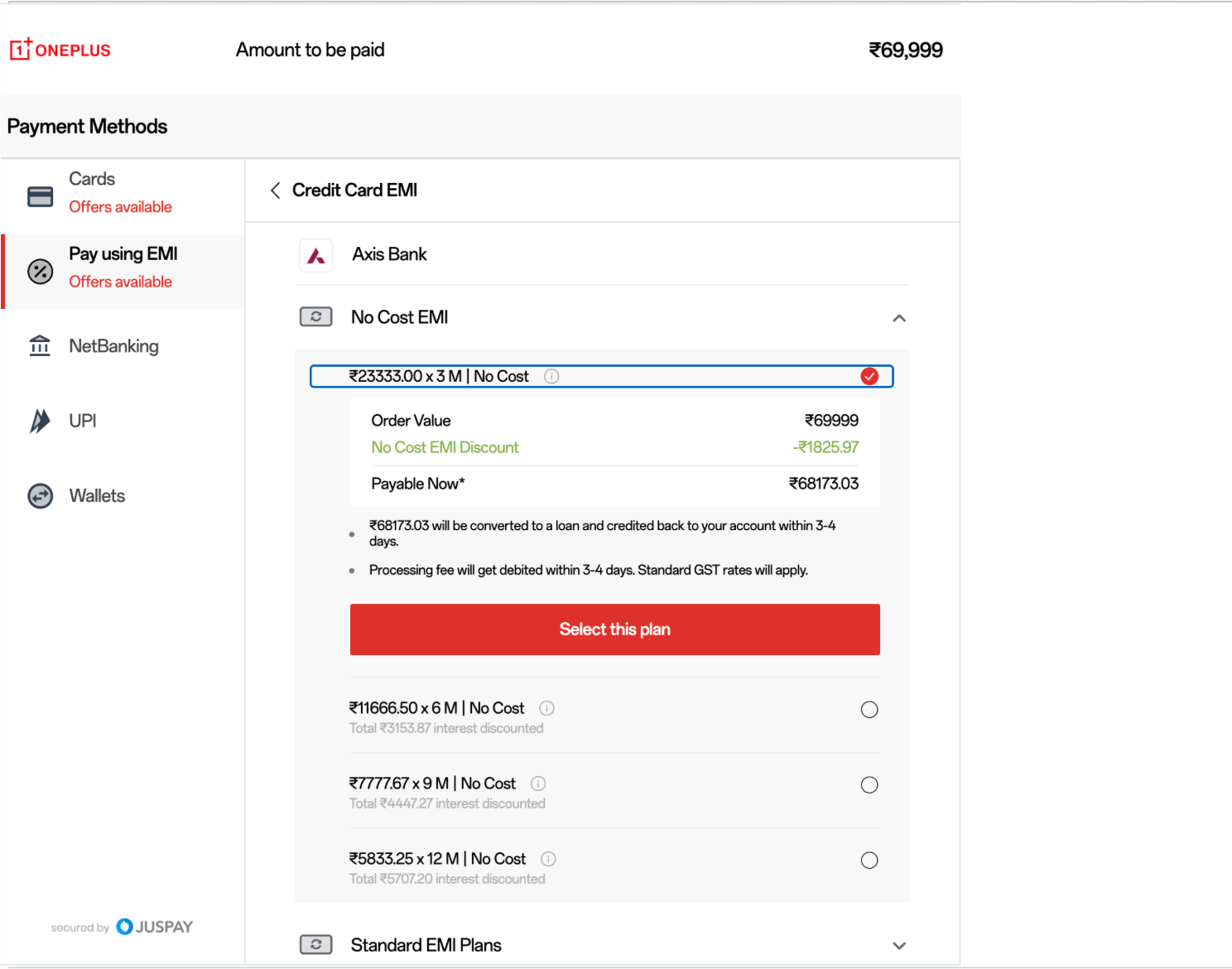
Once a Bank is selected, all EMI plan options, including No Cost, Low Cost and Standard Plan options are visible for the users to choose.
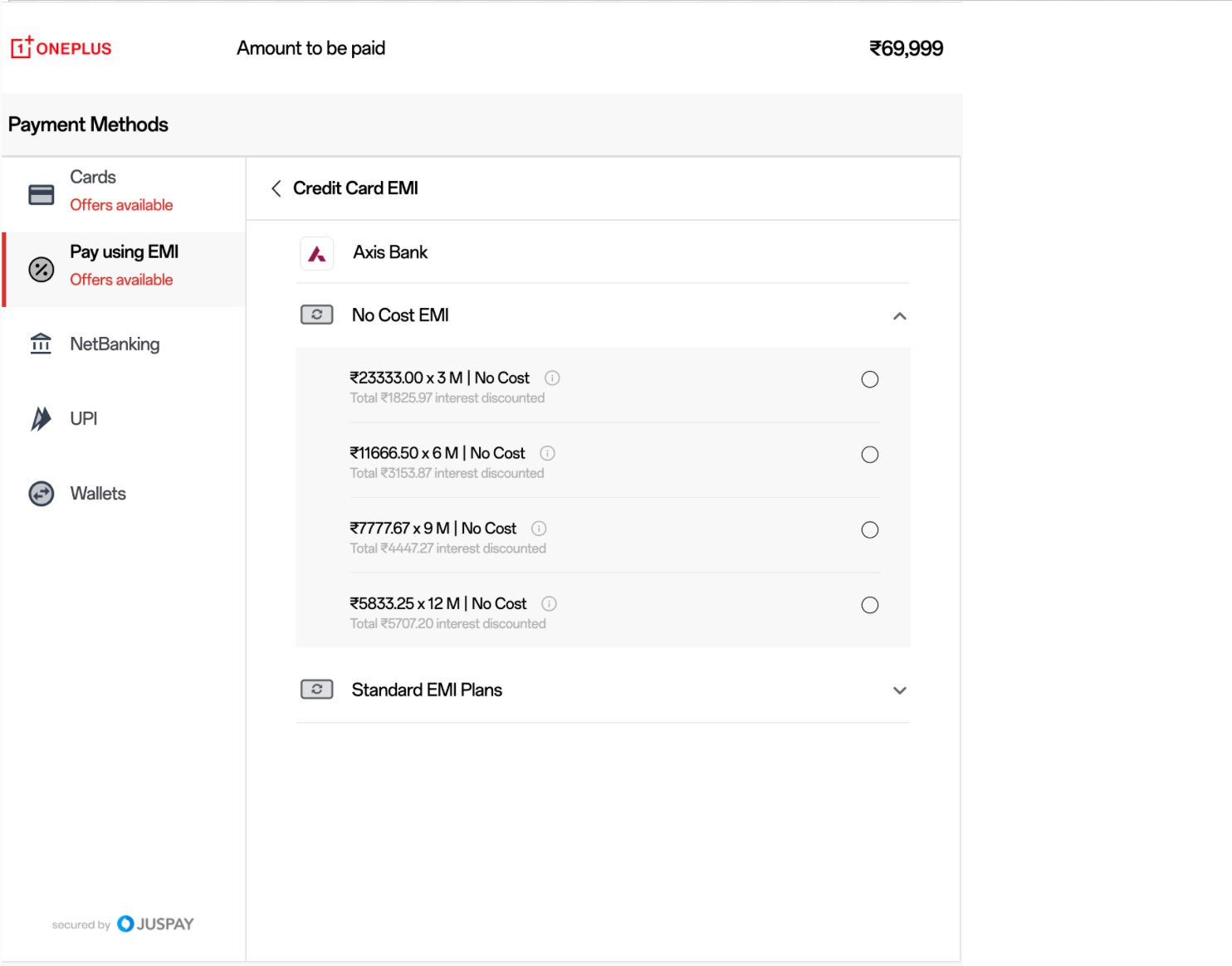
The complete details of the EMI plan can be displayed directly on the payment page once the plan is selected.
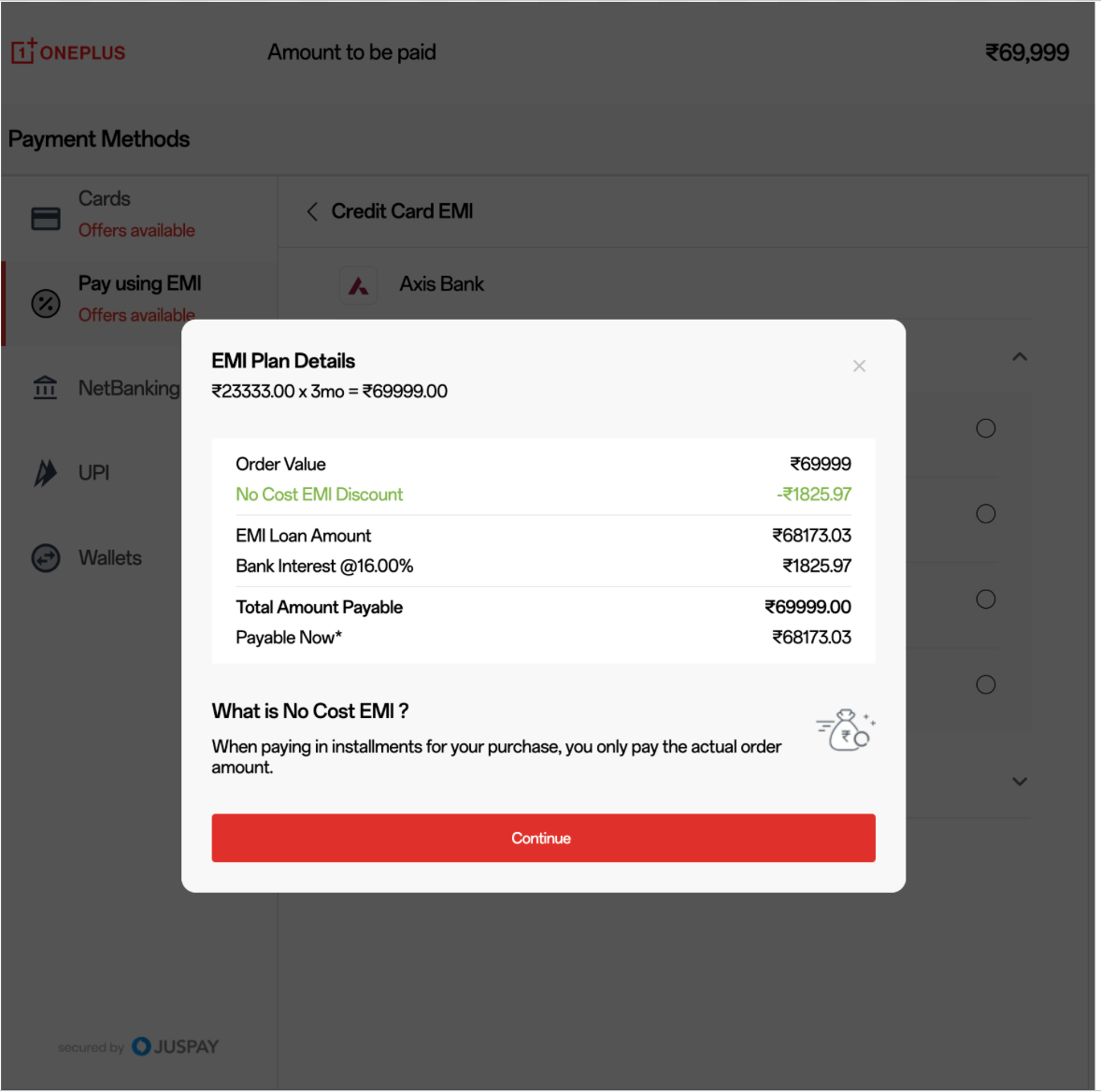
A full breakdown and information about the EMI plan can be provided on a pop-up screen, once the info option is selected by the user.
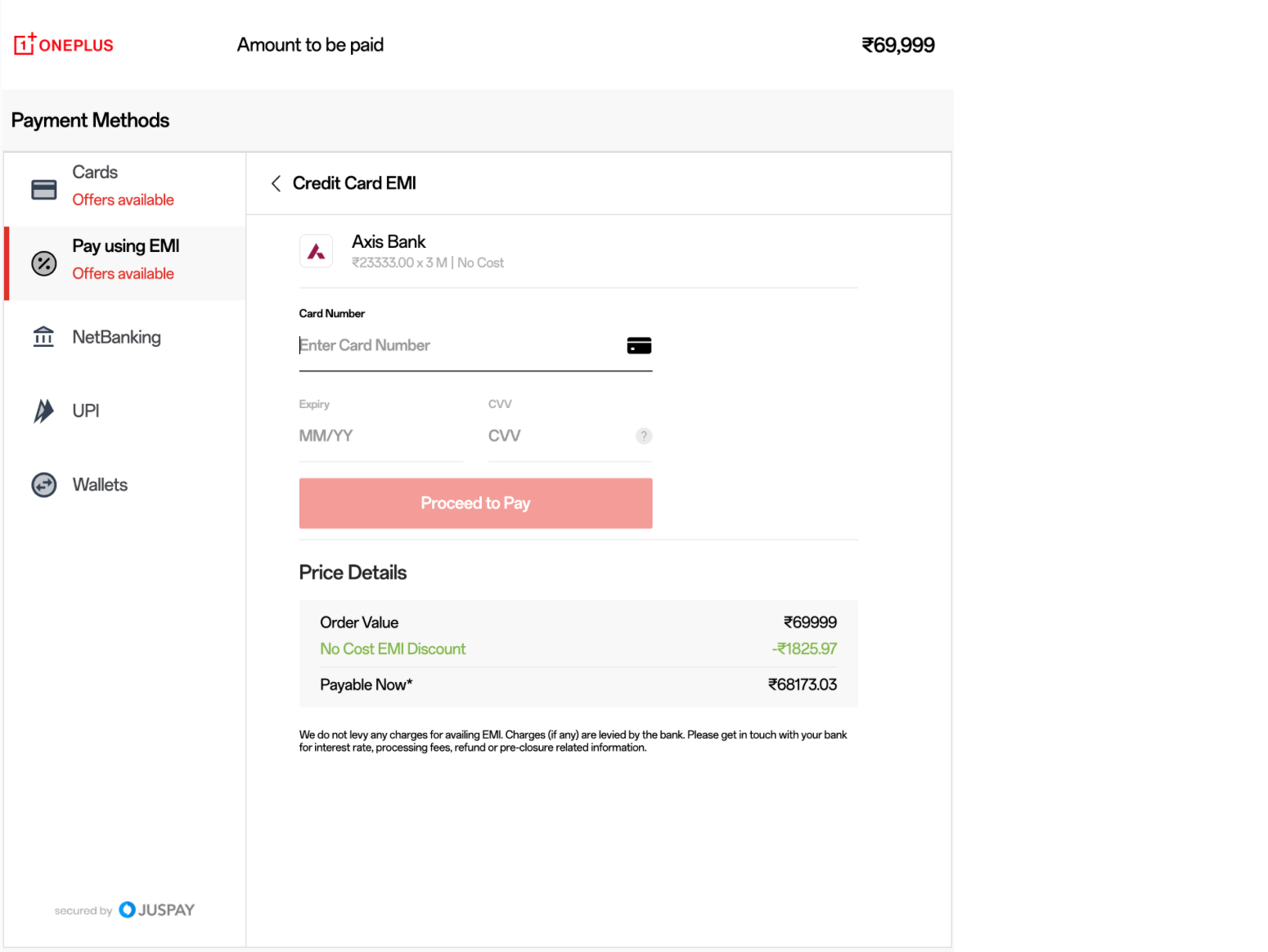
Once a user selects an EMI plan, complete details including discounts applied and the payable amount are displayed for full transparency before proceeding ahead.
Analytics
You can use the Transaction Analytics Module in Juspay Dashboard to monitor the traffic and performance of EMI transactions.
- Have questions?
- Need help? Contact support
- LLM? Read llms.txt
