


Pre-Auth And Capture
Introduction
Pre-Authorization (Pre-Auth) and Capture is a two-step payment process, primarily in industries like hospitality, travel, and e-commerce. It separates the authorization of funds from their final collection, offering both merchants and customers greater flexibility and security during transactions.
Pre-Authorization (Pre-Auth):
The customer's card is temporarily authorized for a specific amount, reserving the funds without actually charging them.
The card issuer verifies that the customer has sufficient funds available.
Pre-Auth does not debit the amount from the customer's account; it just holds it until the transaction is completed or canceled.
Example Use Case:
A hotel might place a pre-authorization hold when a guest checks in, covering the expected room charges and incidentals.
Capture:
Once the transaction is finalized (e.g., after the service is provided or goods are shipped), the merchant submits a request to capture the amount.
This is when the reserved funds are actually debited from the customer's account.
Example Use Case:
After the guest checks out and final charges are determined, the hotel processes the capture, debiting the appropriate amount.
Void:
Void API is used to cancel or void a payment transaction that has been authorized but not yet captured or settled.
This functionality is typically employed in pre-authorization and capture workflows or when a merchant needs to reverse a transaction before funds are debited from the customer’s account.
Example Use Case:
If the guest decides to cancel their booking, the hotel processes a void transaction, ensuring the reserved amount is released back to the guest's account without delay.
Transaction Flow:
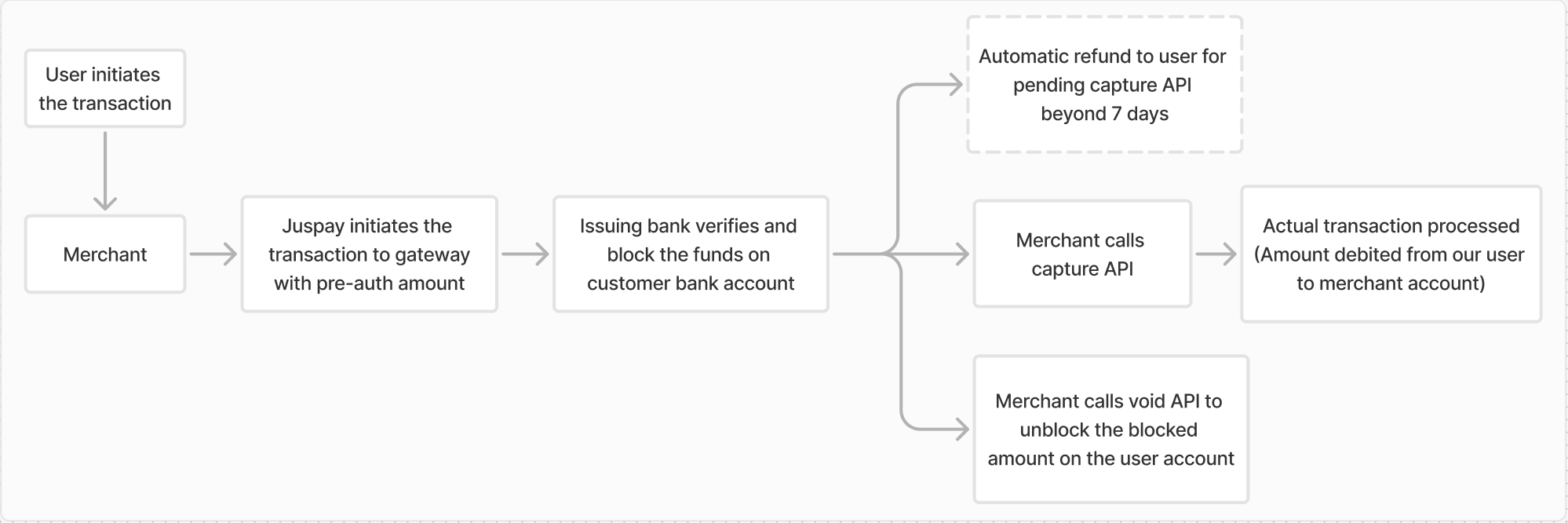
Advantages:
Fraud Prevention: Verifies fund availability without immediate charging, reducing the risk of failed transactions.
Flexibility: Suitable for scenarios where the final charge amount may change.
Customer Satisfaction: Ensures funds are held securely until the transaction is confirmed.
Reduced Chargebacks: Ensures funds are only captured once the goods or services are confirmed, minimizing disputes and chargebacks.
Pre-Auth holds typically expire after a set period (usually 7-30 days) if not captured.
Merchants must ensure timely capture to avoid losing the authorization hold.
Partial capture of the authorized transaction amount is not allowed.
Integration Enablement:
Dashboard Setup:
Enable the required flag in the gateway configuration within the PG Control Center on the Juspay dashboard.
Flag enablement during gateway configuration:
Login to Juspay Dashboard → Select the preferred gateway → Navigate to “Payment Method Configurations” → Select “Advanced Features” → Enable the flag “Pre-authorization”Pre-auth enablement during gateway configuration Flag enablement for existing gateway:
Login to Juspay Dashboard → Select the preferred gateway → Navigate to “Advanced Features” under “Payment Method Configurations” → Enable the flag “Pre-authorization”Pre-auth enablement for existing gateway
New Card Transaction Flow
Call “Card Info” API
 - Get Card details using card bin. You can also use this API to check if a card is eligible for Mandate or direct OTP payments.
Call Order Create API
- Call this API to create an order at Juspay system before initiating the transaction.NoteParameter
metadata.txns.auto_captureasfalseis required to pass in the order creation API for Pre-auth and Capture card transactionsCall “Credit / Debit Card transaction” API
- Call this API using Card details and cvv provided by the customer to initiate a card transaction. The status will be in Authorized State on the successful transaction completion.Call Capture API
- Call this API to confirm and capture the held transaction amount, transferring it to the merchant's account.Call Void API
- Call this API to cancel the held transaction, releasing the amount back to the user's account.NoteMerchant must call
Capture APIto collect the transaction amount andVoid APIto release the held amount back to the user's account.
Saved Card Transaction Flow
Call “List Card” API
- List all the cards stored for a customer. This API gives back only card tokens and other metadata relevant to the cards stored against the customer.Call Order Create API
- Call this API to create an order at Juspay system before initiating the transaction.NoteParameter
metadata.txns.auto_captureis required to pass in the order creation API for Pre-auth and Capture card transactionsCall “Credit / Debit Card transaction” API
- Call this API using card token and cvv provided by the customer to initiate a card transactionCall Capture API
- Call this API to confirm and capture the held transaction amount, transferring it to the merchant's account.Call Void API
- Call this API to cancel the held transaction, releasing the amount back to the user's account.NoteMerchant must call
Capture APIto collect the transaction amount andVoid APIto release the held amount back to the user's account.
Refunds on Pre-auth Transactions:
Refunds can be initiated only for transactions which are in AUTHORIZED status.
Error Codes
|
Scenario
|
Error Codes
|
Description
|
Sample Error Message
|
|---|---|---|---|
Refund on AUTHENTICATION_FAILED transaction
| 400
| Bad Request
| {"error_message":"This refund cannot be processed as the forward order/transaction is not successful.","status":"ERROR","error_code":"invalid.order.not_successful","error_info":{"user_message":"Invalid request params. Please verify your input.","developer_message":"This refund cannot be processed as the forward order/transaction is not successful.","code":"INVALID_INPUT","category":"USER_ERROR"},"status_id":-1}
|
Refund on Voided transaction
| 400
| Bad Request
| {"error_message":"This refund cannot be processed as the forward order/transaction is not successful.","status":"ERROR","error_code":"invalid.order.not_successful","error_info":{"user_message":"Invalid request params. Please verify your input.","developer_message":"This refund cannot be processed as the forward order/transaction is not successful.","code":"INVALID_INPUT","category":"USER_ERROR"},"status_id":-1}
|
Refund with amount greater than the order amount
| 400
| Bad Request
| {"error_message":"Refund amount exceeds the total refundable amount.","status":"ERROR","error_code":"invalid.amount.exceeded","error_info":{"user_message":"Invalid request params. Please verify your input.","developer_message":"Refund amount exceeds the total refundable amount.","code":"INVALID_INPUT","category":"USER_ERROR"},"status_id":-1}
|
Refund on transaction which is in 'PENDING' status
| 400
| Bad Request
| {"error_message":"This refund cannot be processed as the forward order/transaction is not successful.","status":"ERROR","error_code":"invalid.order.not_successful","error_info":{"user_message":"Invalid request params. Please verify your input.","developer_message":"This refund cannot be processed as the forward order/transaction is not successful.","code":"INVALID_INPUT","category":"USER_ERROR"},"status_id":-1}
|
- Have questions?
- Need help? Contact support
- LLM? Read llms.txt
