


A Configuration Guide
Payment Gateway Routing and Optimization in Juspay
Priority Logic is a gateway routing and decision-making framework in the Juspay Payment Platform. It allows you to define rules that determine how payment transactions are routed across configured payment gateways based on performance, business requirements, cost optimization, and fallback handling.
By configuring Priority Logic, merchants can:
Improve success rates by routing to healthier gateways.
Ensure business continuity during gateway downtime.
Route transactions based on payment attributes (card type, issuer bank, PSP, etc.)
Maintain control and transparency over gateway selection.
Accessing the Priority Logic Dashboard
To open the Priority Logic Dashboard:
Juspay Dashboard → Payments → PG Control Center → Priority LogicOr navigate directly to:
https://portal.juspay.in/gateways/priority-logics
1. Dashboard Overview
-RyDIg.jpg)
1.1 Active Priority Logics
The Active Priority Logics section displays all currently active routing configurations along with their real-time performance metrics. This view helps you monitor how each configuration is performing and how traffic is distributed across them.
|
Field
|
Description
|
|---|---|
Configuration Name
| Active routing configuration in use
|
Traffic %
| % of transaction volume routed using this configuration
|
Gateway Undecided
| % of cases where routing decision could not be determined
|
Performance Indicators
| Real-time routing performance and health metrics
|
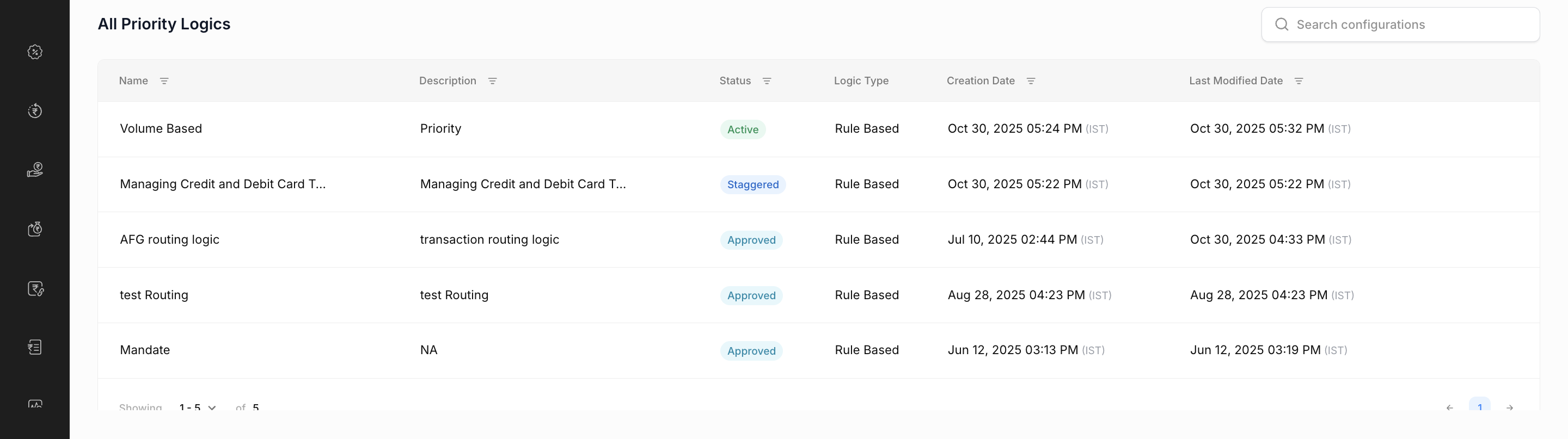
1.2 All Priority Logics Table
The All Priority Logics table lists every routing configuration created. This includes both active and inactive configurations, helping you view, manage, and track the full history of your routing logic setups.
2. Creating a New Priority Logic
You can create three types of Priority Logic configurations based on your business requirements:
2.1 Advanced Routing
Offers maximum flexibility for defining routing rules using various combination of dimensions such as payment method, card BIN, issuer bank, and PSP etc..
Under Advanced Routing, you can choose between:
Rule-Based UI: Create rules using a visual drag-and-drop interface.
Code-Based UI: Define routing behavior using custom JavaScript code (requires additional approval in production).
2.1.1 Rule-Based Priority Logic Configuration
Rule-Based Routing in Priority Logic allows you to define transaction routing conditions using a visual “if–then” interface. This lets you control how payments are directed to different gateways based on transaction attributes for example, card type, card issuer, payment method, amount and more.
Configuring Volume-Based Distribution under this is optional. To get a detailed understanding Click here.
2.1.2 Code-Based Priority Logic Configuration
The Code-Based Priority Logic option allows merchants and developers to define custom routing logic using JavaScript. This configuration method is allowed only for certain advanced usecases, beyond what can not be achieved through the visual Rule-Based UI.
Key Use Cases
Complex routing conditions involving multiple dynamic parameters
2.2 Default Routing
A simple, order-based routing strategy. Traffic is routed according to the priority order of gateways.
2.3 Volume-Based Routing
Routes traffic across multiple gateways based on predefined volume thresholds. This helps distribute load evenly while maintaining optimal performance.
Adjust gateway weights for performance or cost optimization.
3. Core Concepts Behind Priority Logic
3.1 Default Gateway Configuration
This is different from Default Routing. It is configured under both Rule-Based and Volume-Based Routing.
.gif)
It lets you set fallback gateways that process transactions when routing rules configured do not matches, ensuring smooth payment flow and uninterrupted service.
Key highlights include:
Always-available fallback options to keep transactions flowing.
Cascading fallback logic that routes through gateways in sequence.
Emergency routing during outages to maintain uptime.
Performance-based automatic switching for optimal success rates.
3.2 Managing Existing Priority Logics (View, Edit and Delete)
View a Priority Logic: 00:00
Filter and select the configured Priority Logic you want to view, then click to view it.Edit a Priority Logic: 00:14
To make changes, create a copy of the existing logic, update the required configurations, and save it.Delete a Priority Logic: 00:47
Locate the logic you wish to delete, click the bin icon on the right, and confirm the deletion.
Active Priority Logics cannot be deleted. Deactivate them first or Revoke in case of a staggered release.
3.3 Full and Staggered Release
Under Full Release 100% of traffic is routed through the new configuration instantly.
Staggered Release means gradually rolling out a new Priority Logic configuration to live traffic instead of activating it for all transactions immediately.
Only a small percentage of live traffic (say 10%, 20%, etc.) is routed to the new logic initially, while the rest still uses the old configuration.
3.4 Rule Configuration Options
When configuring a new rule within Priority Logic, several options are available to help you manage, share, and enforce routing behaviors effectively.
Import Rule 00:00
Use this option to quickly create or update a rule by importing a JSON file.
You can either upload an existing JSON rule configuration or manually write the JSON code directly in the editor.
Enable Enforce Rule 00:18
The Enforce Rule option lets you strictly apply a particular priority logic without allowing fallback to other gateways.
When enabled, transactions are forced to route only through the gateways or configurations defined in that rule.
This ensures strict routing enforcement, maintaining complete control over transaction routing.
NoteOnce enforced, there will be no fallback to other gateways if a transaction fails on the configured route.
Share Rule 00:34
The Share Rule option allows users to export and share the configured rule in JSON format.
4. Use Cases
5. FAQ & Troubleshooting Guide
Configuration Validation Errors
1. Why do I see “Configuration Name already exists”?
2. What does “Please provide Code field” mean?
3. Why does it show “Need at least 1” for Default Gateways?
4. What causes the “Invalid Conditions” warning?
API and System Errors
5. Why does it show “You do not have access”?
6. What should I do if I see “Something went wrong. Please try again”?
7. Why am I getting “Error! Try Syncing again”?
Code-Based Configuration Errors
8. What does COMPILATION_ERROR indicate?
9. Why do I get a CODE_TOO_LARGE error?
Gateway-Based Configuration Errors
10. What does INVALID_GATEWAY mean?
11. Why am I seeing GATEWAY_NOT_SUPPORTED?
12. Why does it show “No Gateway Selected”?
- Have questions?
- Need help? Contact support
- LLM? Read llms.txt
