


Pinelabs Brand EMI
What is Brand EMI?
Brand EMI refers to a type of Equated Monthly Installment (EMI) payment plan that is offered in collaboration with specific brands or manufacturers. It allows customers to purchase products from those brands and pay for them in installments, often with special benefits such as:
No-Cost EMI: The brand absorbs the interest cost, so the customer only pays the principal amount in installments.
Exclusive Offers: Discounts, cashback, or other incentives provided by the brand for using Brand EMI.
Brand-Specific Tie-ups: EMI options that are only available for products of a particular brand, supported by partnered financial institutions or payment platforms.
This type of EMI is typically promoted during sales, seasonal offers, or product launches to encourage purchases and make high-value items more affordable. For example, a smartphone brand might offer Brand EMI options in collaboration with Pinelabs or a financial partner to drive sales.
Introduction
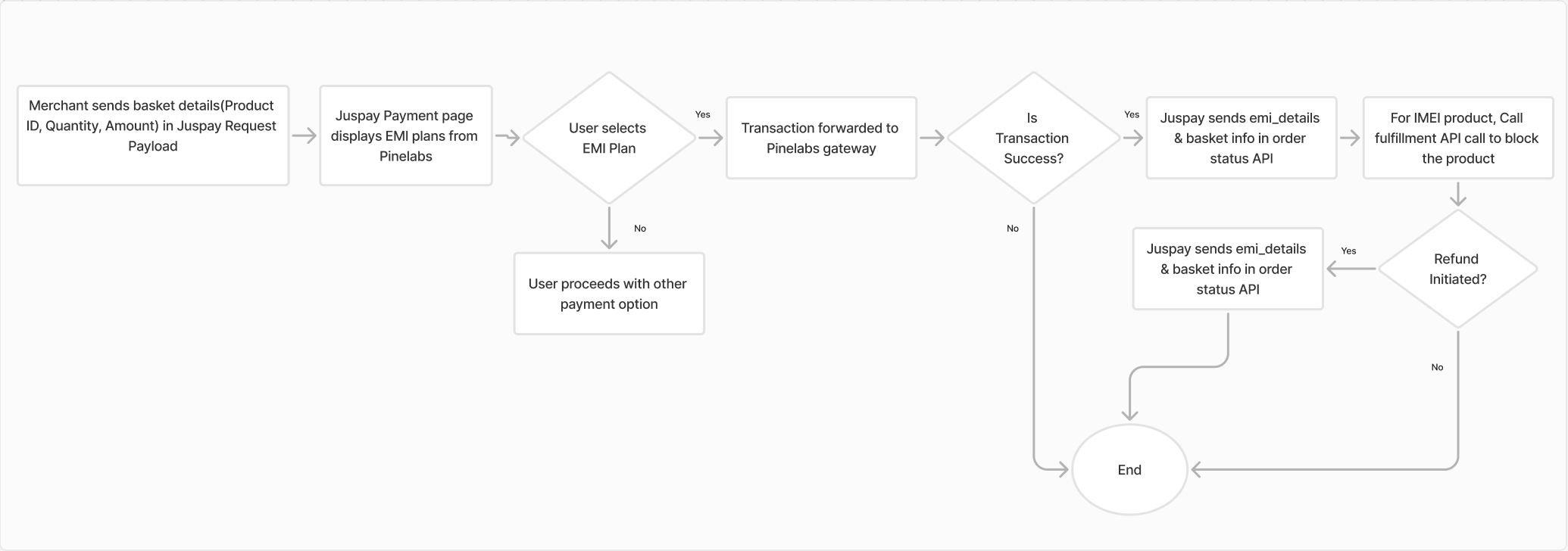
In a multi-cart order scenario, users can add various products to their cart, each supporting different EMI (Equated Monthly Installment) options such as No-Cost EMI, Standard EMI, or EMI cashback. This presents a unique challenge, requiring the payment process to seamlessly manage multiple EMI types within a single transaction.
Pinelabs plays a crucial role in efficiently handling Brand EMI for multi-cart orders, ensuring a smooth and unified payment experience.
Brand EMI flow via Pinelabs does not applicable for merchants using Juspay Offer Engine
Architecture Diagram
Pre-Requisites
Enable the multi-cart feature for your account with Pinelabs.
Set up SKUs for the multi-cart flow on the Pinelabs platform.
Dashboard Configuration
Configure Pinelabs gateway under PG Control Centre section on the Juspay dashboard.
Login to Juspay Dashboard > Navigate to Payments > PG Control Centre > Select gateway > Select “Pinelabs”
Login to Offers Dashboard
 → Pinelabs Configuration
Ensure that Card Payment Method is enabled at “Payment method Configurations” under Pinelabs gateway
Integration Changes and Workflow
- Have questions?
- Need help? Contact support
- LLM? Read llms.txt
