


Pre-applied Offers
User can apply the Offer on Pre-Payment (Order Summary Page) in two ways -
Merchant Discount : Merchant performs benefit calculation on the Pre-Payment Page while Juspay performs Payment Locking on the Payment page.
Pre-Applied Coupons : Benefit calculation is done on Pre-Payment Page via listOffer and on Payment Page benefit calculation and Payment locking is done
Merchant Discount
Merchant handles all the offer related benefit calculations.
For Payment Locking, Merchant has to configure the same offer( same offer code) on Juspay Offers dashboard and choose Coupon based offer = ‘Yes’ & Offer benefits = ‘PAYMENT LOCKING VIA OFFER’ along with respective Payment instruments for which the offer is applicable.
Offer code needs to be sent in the order details payload.
In Juspay’s payment page, coupon applied banner is shown and Payment Locking will happen based on the offer configuration on the dashboard
Users won't be able to remove the Offer from the Juspay Payment page and they have to go back to the Pre-Payment page to Remove/Change the Offer.
On making a transaction, Offerid will be passed in /txns and the same offer will be validated in the backend.
If the Offer Validation fails, Retry popup will be shown to the users which would have an option to redirect to the same payment page with the applied offer. Following event would also be sent to the merchant when the retry popup is triggered.
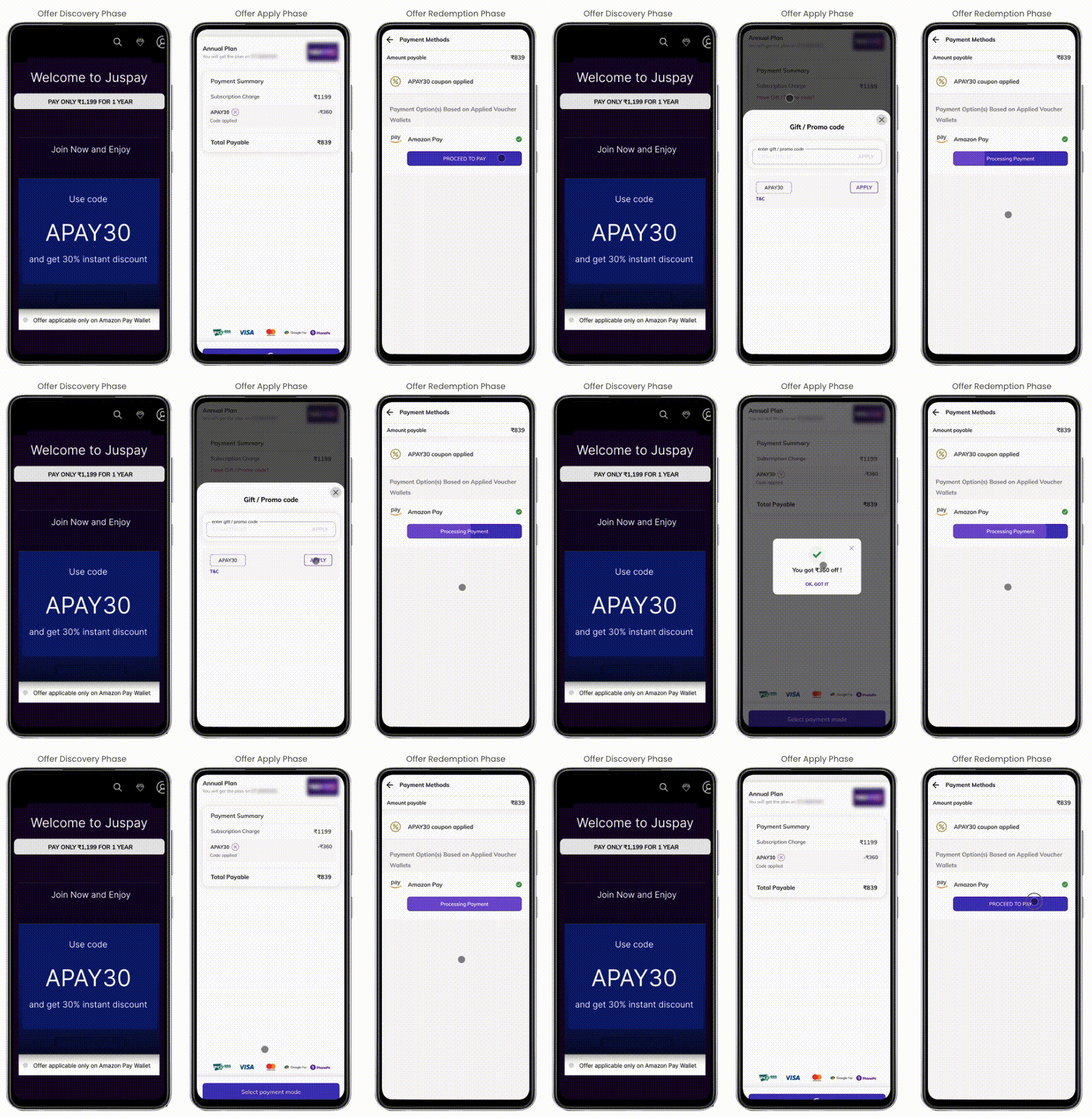
Pre-applied coupons:
Merchant calls listOffers api in their Pre-Payment page where users can check the benefits and apply the offer.
Amount is discounted on the Pre-Payment page and the merchant passes the Original order amount along with applied offer details in order details payload.
Coupon applied banner is shown on the payment page and Benefit calculation along with Payment Locking will happen on the Payment Page based on the offer configuration on the dashboard
User won't be able to remove the Offer from the Juspay Payment page and they have to go back to the Pre-Payment page to Remove/Change the Offer.
On making a transaction, Offerid will be passed in /txns and the same offer will be validated in the backend.
If the Offer Validation fails, Retry popup will be shown to the users which would have an option to redirect to the same payment page with the applied offer.
- Have questions?
- Need help? Contact support
- LLM? Read llms.txt
