


API Guide
This section provides a comprehensive overview of API Integration, including key components like API Endpoints, Request/Response/Callback Structure.
Minimum supported TLS version is v1.3
Every API hits PSP Server with a timeout of 60 seconds.
Section 1 : API Endpoints
To make API calls for your chosen Bank Partner, please use the endpoints provided to you during onboarding, depending on your environment. Insert these endpoints before the respective API URL path.
Section 2 : API Format
This section provides detailed understanding of different parts of the API. Further, each API-specific section includes detailed descriptions of the Request, Response, and associated callbacks.
Request Structure
This section provides a comprehensive breakdown of the core components that make up an API Request. This section gives understanding of Request Headers, Body and JWS Signature generation.
Request Headers
All the required headers for making API calls are as mentioned below.
|
Header Name
|
Header Value
|
|---|---|
content-type *
| application/json
|
x-merchant-id *
| Will be shared while onboarding
|
x-merchant-channel-id *
| Will be shared while onboarding
|
x-timestamp*
| Current Epoch Unix timestamp string. Has to be of 13 digit in Milliseconds. Example: 1496918882000.
|
x-api-version
| Version to be passed relevant to that specific API use case
|
Request Body
The request body contains essential data for the request, including the signature, payload, and protected in JSON format. Every request parameter is required for the API, unless stated otherwise. The data type of all parameters is string.
|
Parameter
|
Description
|
|---|---|
signature *
| JWS signature for the payload
|
payload *
| Base64 encoding of JSON for respective API payload.
|
protected *
| Base64 encoding of JSON for KID and ALGORITHM.
|
You can find a detailed guide on how to create the signature, payload, and protected in the upcoming section.
Request Body Generation - JWS
The signature for a request payload is generated using the RS256 JWS algorithm (a sample code has been attached below). This algorithm involves signing the JSON payload with the private key, which is stored on the merchant's server. It's important to note that all requests from the merchant must be signed using this private key.
The following snippets shows the way to create a signature over data required for the request.
On executing the above code by replacing the private key, payload, and KID, it will produce a response containing the signature, payload, and protected data. These elements make up the body of the API call. The sample response from the codes is attached below.
Sample Response of the JWS Code : Javascript
The response returned by Javascript code is to be passed as the request body while hitting the requests.
Sample Response of the JWS Code : Java
The given code produces a response containing a token separated by periods ('.'). This token is made up of three parts : the protected, the payload, and the signature. When you split the token on the periods ('.'), you get these three components. The first part is the "protected," the second part is the "payload," and the third part is the "signature." You can consider these parts as the request body for the API.
Sample Curl for Request
Below is a sample CURL request to access the APIs. You need to update the request headers with the merchant's credentials and set the request body with the JWS signature response obtained from the previous code section. This modified CURL request should be used to interact with the APIs.
Here are a few potential reasons for encountering an "UNAUTHORIZED" error (Signature Mismatch) when making an API call
Juspay must enable the merchant on the PSP side after receiving the Merchant Public Key and Callback URL without which the merchant is not allowed to hit the APIs
It's essential to generate the Public and Private key pair together. If not generated together, the validation fails.
The payload used to generate the signature must match the payload passed in the request. Disparity in the same will result in validation failure.
Ensure that a UNIX timestamp in milliseconds is included as a mandatory parameter in every payload. Omitting this timestamp will lead to validation failure.
Generate a unique signature for each request. If the same signature is used for multiple requests, it will result in a signature mismatch error.
JWE Encryption
Introduction
Currently Juspay uses signature based algorithms for inbound communication from UPI merchant partners. Juspay has added support for encryption of request/response bodies utilizing JSON Web Encryption (JWE) methodology for enhanced security based on Bank’s recommendation.
Solution Scope And Details
All merchant APIs shall have support for JWE encryption
JWE methodology provides both the encryption and integrity protection, ensuring that data is not exposed to any other party and is not altered.
The symmetric encryption algorithms supported for data encryption are the following
A128GCM
A192GCM
A256GCM
A128CBC_HS256
A192CBC_HS384
A256CBC_HS512
The asymmetric encryption algorithms supported for encryption of the Data Encryption Key (DEK) are the following
RSA1_5
RSA_OAEP
RSA_OAEP_256
More than one set of public-private key pairs can be utilized to enable seamless key-rotation with live traffic. Key rotation can occur in real-time without necessitating new deployments or restarts.
High-level Design And Changes
Exchanging Keys & Key-IDs
A public-private key pair is generated by the merchant for the JWS use case. Merchant will use the private key for creating a signed JWS object for subsequent requests and pass on the public key to Juspay. In return, Juspay will provide a key-Id mapped to this public key (Let’s call this key-Id “JWS-KEY-ID”). This is a one-time activity. Juspay will use the acquired public key for verifying signed JWS objects.
Another public-private key pair is generated by Juspay for the JWE use case. Juspay will pass on the public key and a mapped key-Id (Let’s call this key-Id “JWE-KEY-ID”) to the merchant. This is a one-time activity. Merchant will use the acquired public key for creating encrypted JWE request. Juspay will use the private key for decrypting the JWE request.
Exchanging Key Mechanism
We’ll leverage SFTP mechanism for the key sharing between each other. Juspay will post the public key on the SFTP exposed by Meta. Same mechanism can be used for key rotation after going live
Request Flow
Generating the JWS+JWE request
Create the API request body with iat present in the body.
Create a JSON Web Signature (JWS) object of the API request body in the below format.
protected is the base64 encoded value of the following json
payload is the base64 encoded value of the API request body
signature is the JWS signature value in UTF-8 format
Create the JWE request in the below format.
protected is the base64 encoded value of the following json
encrypted_key is the encrypted Data Encryption Key. Use the psp public key to encrypt the secret and generate the encrypted key.
Initialization Vector (IV) is the base64 encoded value of a random value used to initialize the encryption algorithm.
Ciphertext is the encrypted JWS payload. Symmetrically encrypt the created JWS object using the secret (which may be randomly generated) and initialization vector to generate Ciphertext.
tag is a value used to ensure the integrity of the JWE.
Send the JWE request body to Juspay
Processing the JWE+JWS Request
PSP/Merchant will decrypt the JWE request body using the following process:
Decode the headers to identify the encryption algorithms and kid
Identify the public key based on the kid; Use it to decrypt the encrypted key to get the secret
Decrypt the Cipher text using the secret to get the JWS object and validate it based on the authentication tag
Verify the signature of the JWS object to validate integrity and accept the request.
Sample Request
Sample JWS Request
Sample JWE Request
Script to generate JWS Object
Script to generate JWE Object
Script to parse and decrypt JWE Object
Script to verify JWS Object
Request Generation sample flow
Now let’s take the below raw body request for example.
Now, next we will be generating the JWS object for the above raw request body.
We are using script No 1 for the same. Note that in the script we have configured the following important parameters -
JWS Key Id
Algorithm
Private key
This will output the JWS object, which would look similar to the one mentioned below.
Next we will be generating the JWE object using the above JWS object.
We are using script number 2 for the same. Note that in the script we have configured the following important parameters -JWE Key Id
Data encryption algorithm
DEK encryption algorithm
Public key
This will output the JWE object, which would look similar to the one mentioned below.
Note that this is the final request body to be sent to the PSP.
Response/Callback Verification sample flow
Let’s take the response of above api call for example:
Base64 decode of the protected key. The result should be something similar to the below.
Merchant should use the respective private key mapped with kid to decrypt the encrypted_key text in the response/callbacks.
The decrypted value of the encrypted_key will be a key (say key2) using which cipherText data can be decrypted.
So, using key2 the data of the cipherText should be decrypted. The result of the decryption should look like the below:
Now the original payload is the base64 encoding of the plain text request body. Merchant can decode it.
Now the original payload is the base64 encoding of the plain text request body. Merchant can decode it.
Verify and signature and then get the payload
Now the original payload is the base64 encoding of the plain text request body. Merchant can decode it.
Now the original payload is the base64 encoding of the plain text request body. Merchant can decode it.
Verify and signature and then get the payload
Decoded Plain Text data from JWS request body
Analysis
Distrust the signature’s algorithm field: Juspay uses a hard coded value of algorithm in the code which is “RS256” and does not use the value received in the request body. So, this won’t be a concern.
Distrust any key provided in the JWT field: Juspay implementation does not support picking any public key passed in the request body. public key is fetched from the database on the basis of merchant-Id & key-Id. So, this won’t be a concern.
Distrust arbitrary kid field: Juspay implementation uses kid as a randomly generated uuid and for fetching the public key from the database, the combination of kid and merchant-Id is used, therefore any alteration done to the kid value would result in a row not found error. So, this won’t be a concern.
ErrorHere are a few potential reasons for encountering an "UNAUTHORIZED" error (Signature Mismatch) when making an API call
Juspay must enable the merchant on the PSP side after receiving the Merchant Public Key and Callback URL without which the merchant is not allowed to hit the APIs
It's essential to generate the Public and Private key pair together. If not generated together, the validation fails.
The payload used to generate the signature must match the payload passed in the request. Disparity in the same will result in validation failure.
Ensure that a UNIX timestamp in milliseconds is included as a mandatory parameter in every payload. Omitting this timestamp will lead to validation failure.
Generate a unique signature for each request. If the same signature is used for multiple requests, it will result in a signature mismatch error.
Response Structure
Response Headers
Here is a list of headers that are sent with every response.
|
Header Name
|
Header Value
|
|---|---|
content-type
| application/json
|
x-response-signature
| This is a signature over combination of headers, payload. (Refer Signature Validation section for more details)
|
The header "x-response-signature" will be present only in responses with an HTTP response code of 200.
Response Body
Below is a sample API response format which will be obtained from an executed API request. This example serves to showcase the structure and content of the responses received from the API calls.
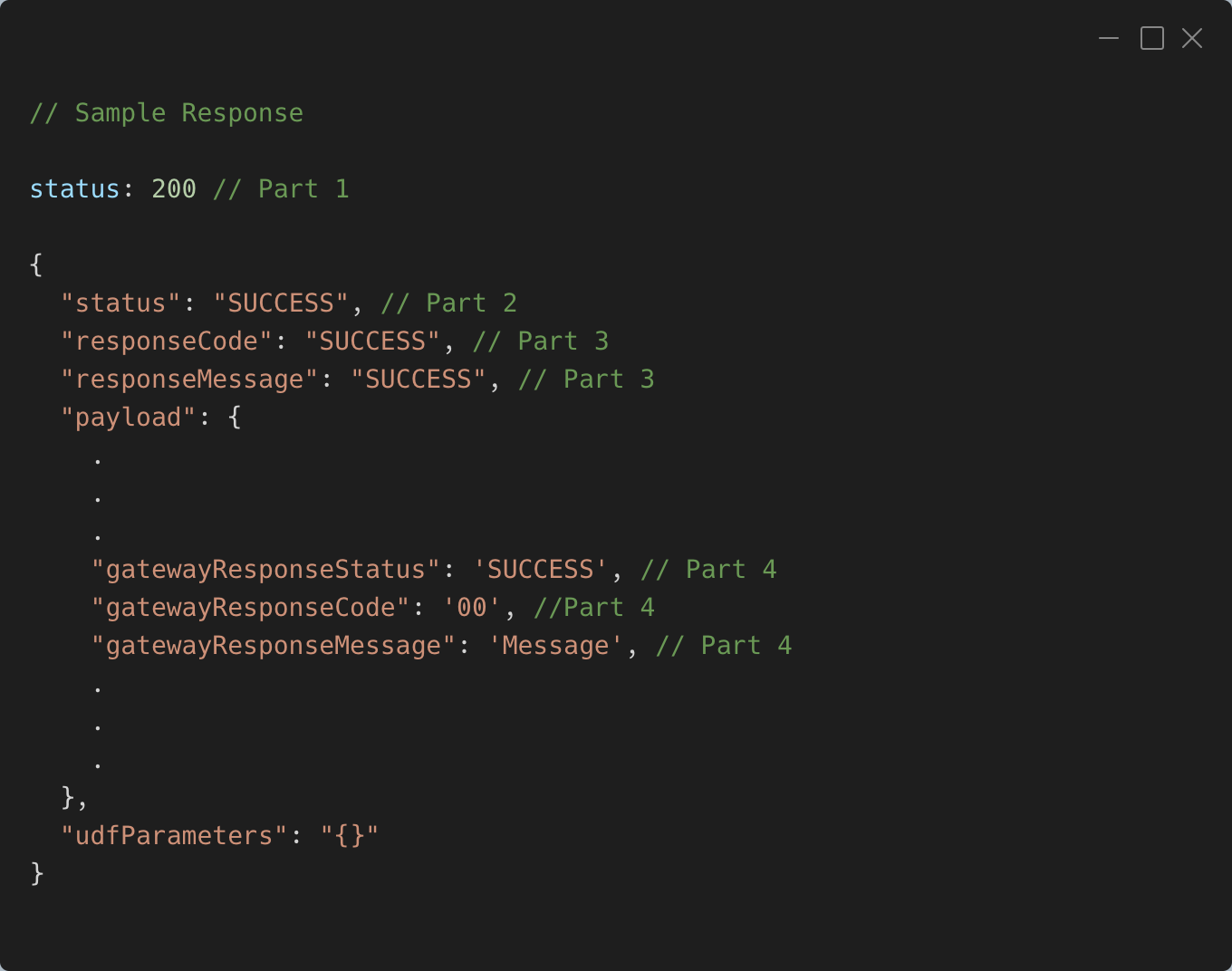
Every API response will include a JSON-formatted response body. Within this response, there is a key called "status" which can have one of two values: "SUCCESS" or "FAILURE." This "status" key helps determine whether the query was successful or not.
When the "status" is "SUCCESS" it means that a valid payload is included in the response. On the other hand, if the "status" is "FAILURE" the response will contain two additional keys: "responseCode" and "responseMessage." These keys provide information about why the query failed.
A detailed Part wise guide on handling different Status & Codes received during API hits from PSP system is available in Resource Section under Codes Guide .
.
udfParameters will be only present in responses where HTTP response code is 200
Response Signature Validation - RSA SHA256
Along with the response, PSP shares response signature which can be verified using the PSP public key as shared during the onboarding. The algorithm used for creating the signature is SHA256 RSA with PSS padding. Following snippet shows how merchant has to validate the signature at their end.
Callback Structure
Callback Headers
Here is a list of headers that are sent with every callback.
|
Header Name
|
Header Value
|
|---|---|
content-type
| application/json
|
x-merchant-payload-signature
| This is a signature over the payload. Refer Signature Validation section for more details.
|
Callback Signature Validation - RSA SHA256
Along with every callbacks, PSP shares payload signature which can be verified using the PSP public key as shared during the onboarding. The algorithm used for creating the signature is SHA256 RSA with PSS padding. Following snippet shows how merchant has to validate the signature at their end. The keys in JSON body will be in alphabetically sorted order.
Callback IP Whitelisting
At the time of onboarding, you will be provided with the IPs through which callbacks are sent. Merchants are required to whitelist these IPs in order to receive callbacks from Juspay.
|
Bank PSP (Juspay PG Name)
|
Sandbox Environment
|
Production Environment
|
|---|---|---|
YES BANK (YES_BIZ PG)
| 52.66.180.181 , 3.6.167.211 , 65.1.25.36
| 65.1.155.56 , 65.1.212.167
|
AXIS BANK (AXIS_BIZ PG)
| -
| -
|
RBL BANK (RBL_BIZ PG)
| 3.7.81.216, 3.111.122.130, 3.7.33.168
| 35.154.139.182, 3.108.88.104, 65.0.255.120
|
- Have questions?
- Need help? Contact support
- LLM? Read llms.txt
